
The website redesign KPI tracker is a free Google Sheet from Clear Digital for recording your site’s key performance indicators before a redesign, during the build, and 30 and 90 days after launch. We built it for B2B marketing and web teams who need one shared place to show what the new site changed.
A redesign has a lot of moving parts, and the numbers you agreed to improve are easy to lose sight of once the build starts. Set your website goals first, then use the tracker to keep the KPIs behind those goals in front of your team.
What the Website Redesign KPI Tracker Covers
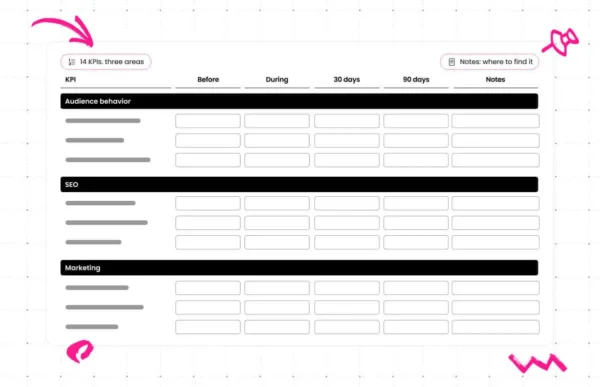
The sheet lists 14 KPIs in three areas. Each KPI has its own row, and you can add rows for metrics specific to your business.
- Audience Behavior: time on site, pages per session, bounce rate, returning visitors and unique visitors.
- Search Engine Optimization: organic traffic, inbound links, Google PageSpeed Insights and organic conversions.
- Marketing Initiatives: leads, click-through rate, cost per acquisition, impressions and conversion rate.
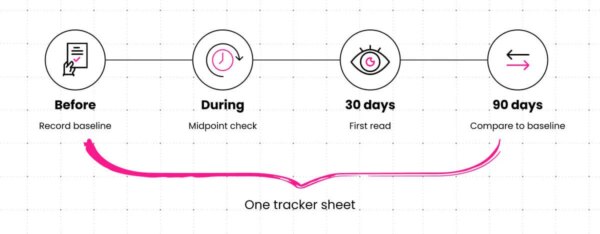
Each row has four columns to fill in: Before Redesign, During Redesign, 30 Days After Redesign and 90 Days After Redesign. Where a row has a number, the notes column says where to find it.
How to Pick Which KPIs to Track for a Redesign
You do not need all 14. Pick the ones tied to what you want the redesign to fix, and track those well.
- Start from the goal. If the redesign is about lead generation, leads, conversion rate and organic conversions matter most. If it is about engagement or content, look at time on site, pages per session and returning visitors.
- Keep the KPIs you can measure today. A metric with no baseline cannot show change. If GA4, Search Console or HubSpot does not report it now, set that up before the build starts or leave the row out.
- Add one KPI per stakeholder question. If your CFO will ask about cost, keep cost per acquisition. If sales will ask about lead quality, add a row for it.
- Agree on the list before launch. Changing KPIs after launch makes the before and after columns hard to compare.
For a closer look at what each metric tells you, read our guide to which B2B website metrics matter.
How to Use the Tracker Before, During and After a Redesign
- Make your own copy. Enter your email below, open the sheet, then choose File > Make a copy so you can edit it.
- Before the redesign, record your baseline. Fill in the “Before Redesign” column with your current numbers. Pull them over a fixed period, and use the same length of period for every later check.
- During the redesign, record what moves. Fill in the “During Redesign” column at a midpoint or just before launch, and check design and content decisions against the KPIs you committed to improving.
- 30 days after launch, take a first reading. Fill in the “30 Days After Redesign” column. Treat it as an early read.
- 90 days after launch, compare. Fill in the “90 Days After Redesign” column, set it beside your baseline and share the sheet with your team.
Who the Tracker Is For
We made the tracker for B2B marketing leaders and web or digital managers who are planning a redesign or have just launched one. It suits teams that report results to people outside marketing: before, during and after columns on one sheet show a CEO or CFO what changed. If you are still making the case for the project, see how to justify a website redesign to your CEO, CFO, or board.
Where to Find Numbers to Compare Against
The tracker records your own numbers. For B2B figures to set them against, see our article on B2B website engagement benchmarks. To set your baseline before you fill in the tracker, see our article on how to benchmark a website before a redesign.
Enter your email address below to open the KPI tracker.
Website Redesign KPI Tracker
Keep track of your key performance indicators before, during, and after launch. Just make a copy of the sheet and customize as needed.
Get our latest insights in your inbox


How Enterprise Websites Win the Room: The 5-Part Room-Readiness Framework
By Clear Digital on October 29, 2026
Read more
8 Criteria for Choosing a B2B Web Redesign Agency
By Clear Digital on September 15, 2026
Read more