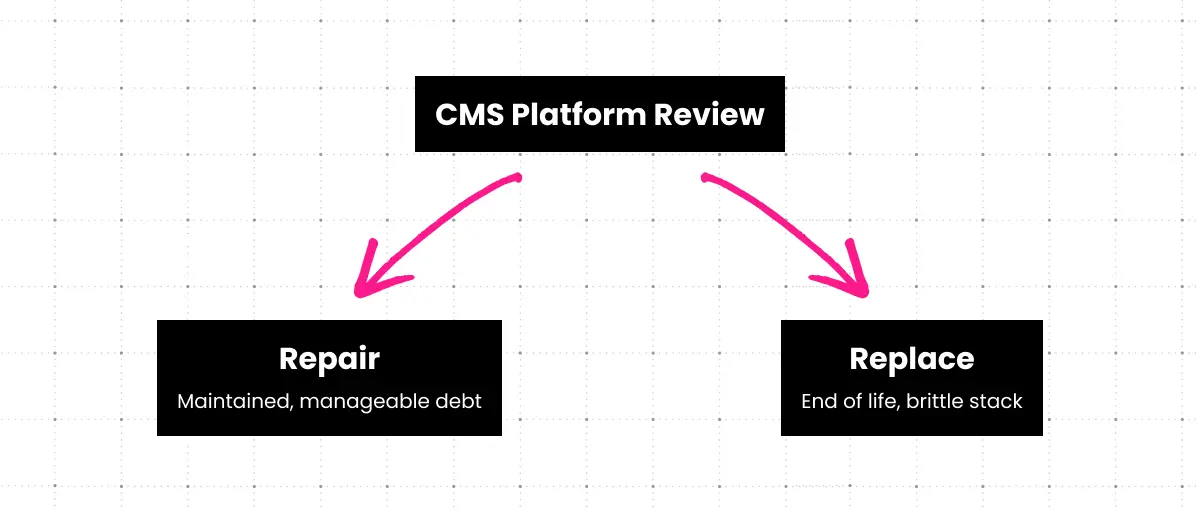
When should you repair vs. replace? If your platform is actively maintained, your technical debt is manageable, and your primary issues are configuration or content governance rather than platform capability, repair may be the right call. But if your platform is end-of-life, your customizations are brittle, or your integration requirements outpace what the platform can support, migration is the stronger long-term investment.

ArticleDXP & CMS Platforms
CMS Migration Checklist For Enterprises: A Complete Guide to Seamless Platform Transitions
A CMS migration is not a website refresh. It is a mission-critical initiative that touches every part of your digital operation: content, performance, integrations, compliance, and the SEO equity your team has spent years building. When it goes well, it unlocks capabilities your current platform could never offer. When it goes wrong, the consequences are measurable — sometimes in millions of dollars of lost organic traffic, derailed product launches, or months of emergency remediation.
Enterprises face pressures that smaller organizations simply don’t. You’re maintaining 24/7 uptime while migrating. You’re preserving rankings across thousands of pages. You’re coordinating across IT, marketing, legal, compliance, and executive stakeholders who all have different definitions of “done.” And you’re doing it on a timeline that doesn’t bend easily.
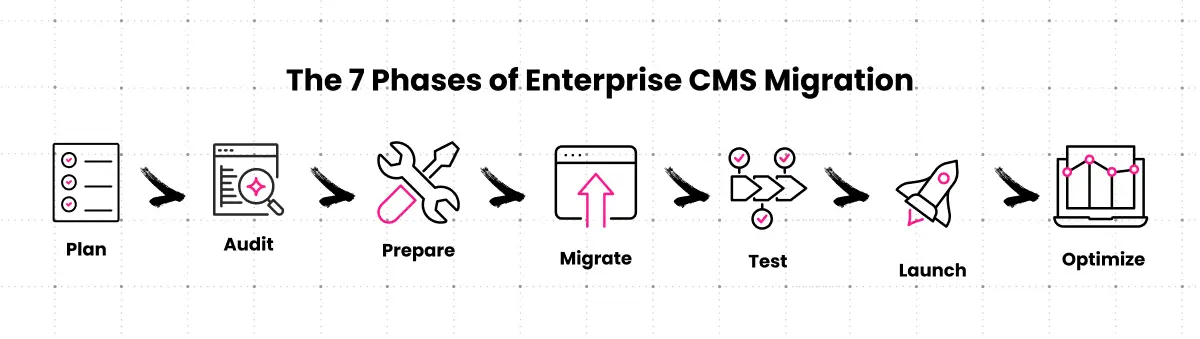
This guide is the enterprise CMS migration checklist your technology team needs. It covers all seven phases of a successful migration: strategic planning and stakeholder alignment, comprehensive auditing, technical preparation, content migration execution, testing and QA, go-live management, and post-migration optimization. Where the process is sequential, it follows that order. Where tradeoffs require judgment, those decisions are called out explicitly.
Clear Digital has supported DXP and CMS platform migrations for B2B technology enterprises for more than 25 years. The framework here reflects what works at scale, and where migrations go sideways when teams skip steps or underestimate complexity. The goal isn’t just to get off your old platform. It’s to land on a foundation that supports better web experiences, faster content velocity, and continuous improvement.
Why Enterprises Migrate Their CMS: Understanding the Business Drivers
No organization undertakes a CMS migration because it seems fun. There’s always a forcing function. A moment when the cost of staying on the current platform exceeds the cost and complexity of moving. Understanding that forcing function shapes every priority decision throughout the migration.
The most common business drivers among B2B technology companies:
- Performance and scalability ceilings. Legacy platforms that handled 50,000 monthly visitors often buckle under 500,000. Slow load times hurt search rankings and conversion rates simultaneously. Infrastructure costs compound without delivering proportional value.
- Security and compliance exposure. Platforms without active security development accumulate vulnerabilities. For enterprises operating under GDPR, CCPA, SOC 2, or HIPAA requirements, an outdated CMS isn’t just a technical liability. It’s a legal one.
- Accumulated technical debt. Every customization, patch, and workaround added to an aging platform makes the next one harder. Most teams reach the inflection point where maintenance costs exceed migration costs later than they should.
- Integration incompatibilities. Modern go-to-market stacks require deep technology integration: CRM, marketing automation, CDP, analytics, personalization engines. Older platforms often can’t support these without expensive custom development that breaks with every update.
- Content velocity and editorial friction. If your content team needs a developer to publish a new page type, that’s a platform problem. Poor authoring experiences slow campaigns, reduce content output, and create workarounds that compound over time.
- Omnichannel demands. Headless and hybrid CMS architectures exist because content now needs to reach web, mobile, apps, and digital signage from a single source of truth. Tightly coupled platforms weren’t built for this.
The decision to migrate should be anchored in data, not frustration. Before committing, document the actual business cost of staying: developer hours spent on maintenance, campaign delays caused by platform limitations, revenue impact of slow page performance, and compliance exposure. That analysis usually makes the migration case conclusively.
Build the Right Team and Governance Structure Before Anything Else
Enterprise CMS migrations fail for many reasons. Unclear ownership is near the top of the list. When decision-making authority is distributed without structure, small disagreements become blocking issues, and blocking issues become timeline disasters.
A successful migration team needs representation from every organizational function the platform touches:
- Executive sponsor. Removes roadblocks, controls budget, and keeps the initiative visible at the leadership level. Without executive sponsorship, migration projects routinely get deprioritized when competing demands appear.
- Project manager / PMO lead. Coordinates workstreams, owns the timeline and dependency map, and maintains communication across all stakeholders. In complex migrations, this is a full-time role.
- Technical leadership. CTO or VP Engineering representation, plus infrastructure, DevOps, and security. These stakeholders define technical requirements and own the go-live decision.
- Content and marketing stakeholders. CMO or VP Marketing, SEO specialists, content strategists, and digital marketing managers. They own SEO preservation requirements and content governance decisions.
- IT and development resources. Platform architects, developers, database administrators, and integration specialists.
- End users. Content authors, editors, and administrators who will use the system daily. Their workflow requirements often surface problems that technical teams miss.
- External partners. Implementation agency, platform vendor support, and specialized consultants. Clear Digital works as an extension of client teams. That distinction matters for communication and accountability.
Governance structure should be established before work begins: who can make decisions at each level, how change requests are evaluated, escalation paths, and communication cadences. A weekly cross-functional status meeting and a clear RACI matrix are not bureaucratic overhead. They are the mechanisms that keep complex migrations on track.
Selecting the Right CMS Platform: Requirements Before Demos
If your enterprise hasn’t yet selected its target CMS, requirements analysis is the foundation everything else rests on. Even if platform selection is complete, this step validates that the chosen platform can support all identified needs before migration work begins.
Requirements gathering should cover functional needs (content types, workflows, permissions, multilingual capabilities), technical needs (API architecture, integration capabilities, performance targets), scalability and compliance requirements, and total cost of ownership evaluated over a 3–5 year horizon, not just year one.
Common enterprise CMS categories worth evaluating include WordPress (including managed enterprise hosting through Pantheon or WP Engine) and Drupal for teams that want editorial flexibility without vendor lock-in, headless and API-first systems (Contentful, Contentstack, Sanity) for organizations distributing content across many channels, and full digital experience platforms (Adobe Experience Manager, Acquia, Optimizely) for enterprises that need DXP-level personalization and are prepared for the Adobe ecosystem commitment that comes with it. The right category depends on your team’s actual editorial and integration needs, not on which platform sounds most enterprise-grade.
In practice, Clear Digital’s enterprise clients increasingly land on WordPress and Drupal once they weigh real implementation cost, time-to-launch, and ongoing vendor flexibility against DXP platform lock-in. Our Drupal and WP Engine partnerships reflect where that work actually happens.
Clear Digital takes a platform-agnostic approach to DXP and CMS platform selection, recommending the right solution for each client’s specific requirements and team capabilities. User research with actual content authors during platform evaluation surfaces workflow requirements that technical assessments often miss.
One underused step: run a proof of concept before committing. Test critical editorial workflows, validate integration assumptions with real data, and have actual users assess the authoring experience. Discovery here costs less than discovery after migration begins.
Set a Realistic Timeline, Budget, and Success Metrics — With Baselines
Realistic planning prevents the most common migration failure mode: scope creep that expands timeline and budget until the project becomes unmanageable.
Timeline expectations: Enterprise migrations typically run 4–9 months depending on content volume, integration complexity, and custom development requirements. Build in 15–20% contingency. Migrations that skip contingency planning routinely need it. Avoid launching during peak business periods, major campaigns, or fiscal quarter-end. Monday through Wednesday morning launches give you the best chance of addressing issues with a full team available.
Budget components to account for: Platform licensing or subscription costs, implementation services (internal and external), content migration tooling and manual effort for exceptions, custom development and integration work, training and change management, testing and QA resources, post-launch monitoring and support, and a contingency reserve of 10–15% minimum.
Success metrics need baselines. Before migration begins, document your current state: organic traffic by section, Core Web Vitals scores, keyword rankings, conversion rates, and content velocity (average time from draft to published). Without baselines, you can’t measure what changed or why.
Start With a Complete Content and Technical Audit
Conduct a Full Content Inventory
You cannot migrate what you don’t know you have. Content discovery consistently surprises enterprise teams — pages with active backlinks that haven’t been touched in years, product documentation spread across three site sections, media libraries with no clear ownership. The inventory makes all of it visible before migration scripts touch anything.
A complete content inventory requires:
- Automated crawling. Tools like Screaming Frog, Sitebulb, or enterprise-grade crawlers like Lumar discover all URLs, content types, and assets. For large sites, configure depth and scope carefully to ensure full coverage.
- Content categorization. Separate pages, posts, documentation, product pages, landing pages, media assets, and downloadable resources. Different content types often require different migration approaches.
- Content assessment decisions. For each item, assign one of four statuses: migrate as-is, update before migration, archive, or delete. This involves stakeholders across marketing, content, and legal — plan time accordingly.
- Metadata capture. URLs, title tags, meta descriptions, heading structure, internal links, external links, publication dates, authors, and taxonomies. This data feeds directly into your redirect map and SEO preservation strategy.
- Asset inventory. Images, videos, PDFs, and documents with file sizes, formats, storage locations, and usage context. Large media libraries are often the most time-consuming part of migration.
For enterprises with tens or hundreds of thousands of pages, this phase is genuinely substantial. The payoff extends beyond migration: content audits regularly surface optimization opportunities and years of digital clutter that have been quietly undermining site performance.
Pre-migration content audit checklist:
- Full site crawl completed with all URLs documented
- Content categorized by type (pages, posts, docs, media)
- Migrate / update / archive / delete decision made for all content
- All metadata captured: URLs, titles, meta descriptions, H1s, internal links
- Media and asset inventory complete with file sizes and locations
- Redirect map started for content being consolidated or removed
- Stakeholder sign-off on content disposition decisions
Map Your Technical Infrastructure and Integrations
Content is one layer. The technical environment is another, and for enterprises, it’s often the more complex one. Hidden dependencies and undocumented integrations derail migrations that looked clean on paper.
The technical audit should document the current platform state (version, customizations, plugins, technical debt), full integration mapping (CRM, marketing automation, analytics, search, e-commerce, SSO, APIs, and webhooks), infrastructure configuration (hosting, CDN, DNS, SSL, backups, deployment), custom functionality that must be replicated or replaced, performance baselines for Core Web Vitals and traffic patterns, and security and compliance documentation.
Technology integration complexity is frequently underestimated in pre-migration planning. An integration that “just works” on the current platform often requires substantial re-engineering on a new one. Document every integration before planning begins, not after. For each piece of custom functionality: can it be recreated natively, does it require custom development, or should it be retired? Analytics infrastructure needs to migrate alongside the content that feeds it.
Build Your SEO Preservation Strategy Early
For enterprises that have built organic search presence over years, SEO preservation is often the highest-stakes aspect of the entire migration. A significant ranking drop costs real revenue, and recovery timelines are measured in weeks, not days.
SEO audit essentials: Export organic traffic by page and section, keyword rankings (top 10, 50, and 100), backlink profile and referring domains, and conversion rates from organic before migration work begins. Audit URL structure for redirect chains — any chain longer than two hops needs to be collapsed — canonical tag implementation, URL parameters, and pagination. Inventory title tags, meta descriptions, H1–H6 heading structure, image alt text, structured data markup, and internal linking architecture.
SEO preservation strategy framework:
- Maintain existing URLs wherever possible. This is the single highest-impact SEO preservation decision in the entire migration. When URLs must change, a comprehensive redirect map is non-negotiable: every old URL to its new destination, without chains.
- Content parity. Migrated content must maintain keyword targeting, preserve internal linking structure, and replicate or improve content quality. This doesn’t happen automatically; it requires explicit validation.
- Technical SEO replication. Title tags, meta descriptions, schema markup, canonical tags, and sitemap configuration need to be intentionally implemented on the new platform.
- Monitoring plan. Define the metrics to track daily in the first two weeks post-launch, establish alert thresholds for traffic drops, and assign someone responsible for rapid response.
Clear Digital’s web experience practice integrates SEO preservation planning from the earliest stages of migration work, not as a final checklist item, but as a requirement that shapes technical and content decisions throughout.
Prepare the Technical Environment and Migration Scripts
Configure the New CMS Environment Correctly
With auditing complete, the technical build phase begins. Enterprise migrations require at minimum three environments: development (for active building and testing), staging (a production replica for final validation), and production (the live environment). Content should only move to production after validating in staging.
Infrastructure configuration — server and hosting setup, CDN configuration and caching rules, database provisioning, SSL certificates, security hardening, backup and disaster recovery, and monitoring with alerting — needs to be fully documented and tested before content migration begins.
Get the content model right before any content migrates. Retrofitting a content model after migration is significantly more expensive than designing it correctly upfront. The staging environment deserves particular investment: treat it as a production replica so testing results actually reflect launch conditions.
Develop and Test Migration Scripts Iteratively
For enterprises migrating substantial content volumes, automated migration scripts are necessary. Manual migration doesn’t scale to thousands of pages, and it introduces inconsistency at exactly the stage where consistency matters most.
The migration script pipeline: extract content from the legacy CMS via API, database export, or crawl-based scraping; transform it by mapping old content structures to new content models and cleaning data; validate for completeness and edge cases before importing anything; then load into staging first, always.
Use an iterative testing approach. Start with a small batch of 10–50 pages, validate thoroughly, refine scripts based on findings, then gradually increase batch sizes. Run the full migration in staging before touching production. Common migration challenges include character encoding problems, media file handling, internal link preservation, custom field mapping, and edge cases that only appear at volume.
Don’t rush migration script testing. Data quality issues discovered post-launch are significantly more expensive to fix than those caught in staging. Build in iteration cycles, not just one test run.
Clear Digital’s custom development team builds migration scripts tailored to each client’s content structure and target platform, with validation checkpoints designed to catch edge cases before they reach production.
Build a Bulletproof Backup and Rollback Plan
Before any migration activity touches the production environment, backup and rollback procedures need to be defined, tested, and documented. This is the difference between a recoverable incident and a crisis.
Backup requirements: Full database export (verified complete), all media and asset files, configuration files and custom code, DNS records and server configuration documentation, stored in multiple locations with a tested restore process.
Rollback plan requirements: Clearly defined triggers (what conditions require reverting), step-by-step procedures documented and accessible to the team executing them, a named decision-maker with authority to call a rollback, communication protocols for internal and external stakeholders, and the rollback procedure tested in staging before launch.
Having a rollback plan doesn’t mean expecting to use it. It means the team can launch with confidence knowing there’s a clear path back if something goes wrong.
Ready to execute a seamless enterprise CMS migration?
Partner with Clear Digital to navigate your migration with confidence. Our 25+ years of B2B expertise means we understand the stakes, and know how to deliver successful migrations that preserve SEO, minimize risk, and unlock new capabilities.
Execute Content Migration in Stages
Use a Staged Migration Approach
Enterprise migrations rarely move all content at once. A staged approach reduces risk exposure, allows teams to learn and refine between phases, and maintains business continuity throughout.
Common staging strategies:
- By content type. Migrate the blog first, then product pages, then technical documentation. Teams get efficient at one content type before moving to the next.
- By business unit or brand. For multi-brand enterprises, migrate one brand at a time. Each migration has a defined scope, and issues stay contained within that scope.
- By traffic priority. Migrate low-traffic sections first to build confidence and refine processes before tackling high-stakes content.
- Pilot approach. Select a representative content subset, migrate to production with limited visibility, validate thoroughly, then expand. Real-world validation that staging can’t fully replicate.
Staged migration requires coordination discipline. Content teams need to know what sections are frozen and when. Content updates to sections currently being migrated should follow a documented content freeze protocol.
Maintain SEO Throughout the Migration, Not Just at the End
SEO preservation isn’t a post-migration activity. It runs as a parallel workstream through every phase of content migration execution.
Maintain existing URLs wherever the platform allows. For URLs that must change, implement 301 permanent redirects at the server level using the redirect map developed during the audit phase. Every redirect should be tested individually. Chains (URL A redirects to B which redirects to C) need to be collapsed. Each additional hop dilutes link equity.
Title tags, meta descriptions, H1 structure, image alt text, internal links, and structured data markup all need to be explicitly replicated. Review each content type’s template to confirm these elements are captured. Submit the updated XML sitemap to Google Search Console after launch. Confirm canonical tags are implemented correctly.
Track organic traffic and rankings daily during active migration phases. Watch for 404 errors in server logs, which indicate redirect gaps. Define your SEO emergency response plan before migration begins: who gets notified when organic traffic drops 15%, who has authority to implement emergency redirects, and what the escalation path looks like.
Test Everything Before Launch
Functional Testing Across All Content Types
Thorough testing separates successful migrations from ones that launch with problems. This phase cannot be compressed when the schedule slips.
Functional testing covers:
- Content accuracy. Verify content migrated completely and with correct formatting. Validate that images and media display correctly. Confirm all internal and external links work.
- Interactive elements. Test forms, search functionality, user authentication, CTAs, and all conversion paths. A broken form doesn’t fail silently; it costs pipeline.
- Navigation and site structure. Main navigation, breadcrumbs, footer links, category and taxonomy pages, and pagination all need validation.
- User roles and permissions. Test content author access, editor workflows, approval processes, and admin functions. Permissions issues discovered post-launch create immediate disruption.
- Cross-browser and responsive testing. Chrome, Firefox, Safari, and Edge on both desktop and mobile. Test on actual devices, not just browser emulation.
- Performance. Measure page load speeds and Core Web Vitals. Test under simulated traffic loads. Verify CDN caching behavior.
UX and UI validation should include real users from content teams who can identify workflow issues that automated tests miss.
Security, Compliance, and Performance Validation
For enterprises — particularly those in regulated industries — security and compliance validation is a non-negotiable gate before launch.
Security testing includes vulnerability scanning, penetration testing scoped to your risk profile, authentication and authorization testing across all user roles, data encryption verification, SSL/TLS configuration and security header implementation, and input validation against XSS, CSRF, and SQL injection.
Compliance validation covers GDPR and CCPA requirements, accessibility standards (WCAG 2.1 AA minimum), industry-specific requirements such as HIPAA or SOC 2, cookie consent implementation, and data retention and deletion procedures. Compliance validation requires involvement from legal and compliance teams — build that coordination into your testing timeline.
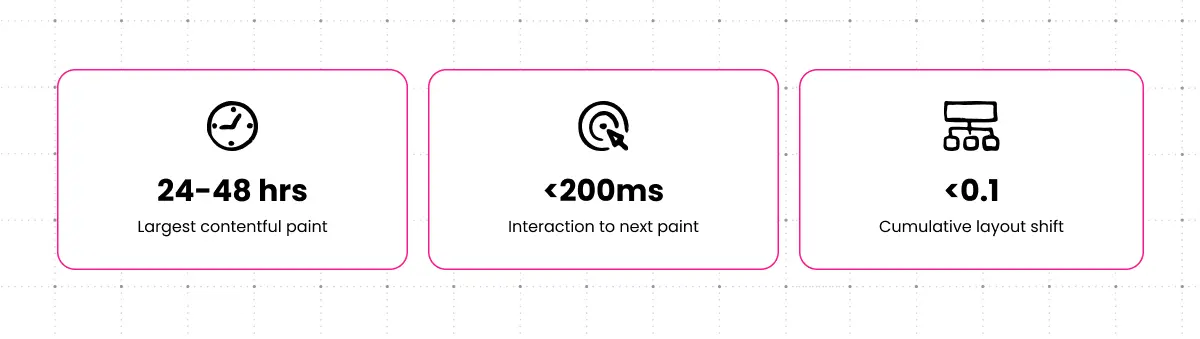
Core Web Vitals targets before launch: Largest Contentful Paint (LCP) under 2.5 seconds, Interaction to Next Paint (INP) under 200ms, Cumulative Layout Shift (CLS) under 0.1. Test with Google PageSpeed Insights, GTmetrix, and WebPageTest across representative page types on both desktop and mobile.
Run a full crawl before launch. Validate XML sitemap structure and accessibility. Confirm robots.txt allows crawling of all intended content. Verify structured data with Google’s Rich Results Test. Check for duplicate content created during migration and validate canonical tags across all page types.
Manage Go-Live With Precision
Pre-Launch Checklist and Final Preparations
The 48 hours before launch are not the time to discover gaps. A comprehensive pre-launch checklist, worked through systematically, prevents last-minute surprises.
- Final content review. Spot-check the homepage, key landing pages, top-traffic pages, and navigation. Verify contact information, CTAs, and conversion paths.
- Technical validation. Confirm DNS records are staged. Verify SSL certificates. Test backup and monitoring systems. Validate CDN configuration.
- SEO preparation. Redirect map fully implemented and tested. XML sitemap ready for submission. robots.txt correct. Analytics tracking validated in staging. Google Search Console access confirmed.
- Team readiness. Support team briefed. Rollback team on standby with clear decision authority. Escalation procedures confirmed. All-hands communication channel established.
Launch timing: Monday through Wednesday morning launches are the standard recommendation. This gives the full team availability for immediate response if issues surface. Avoid Fridays, holidays, and periods that coincide with major campaigns or product launches.
DNS Cutover and the First 72 Hours
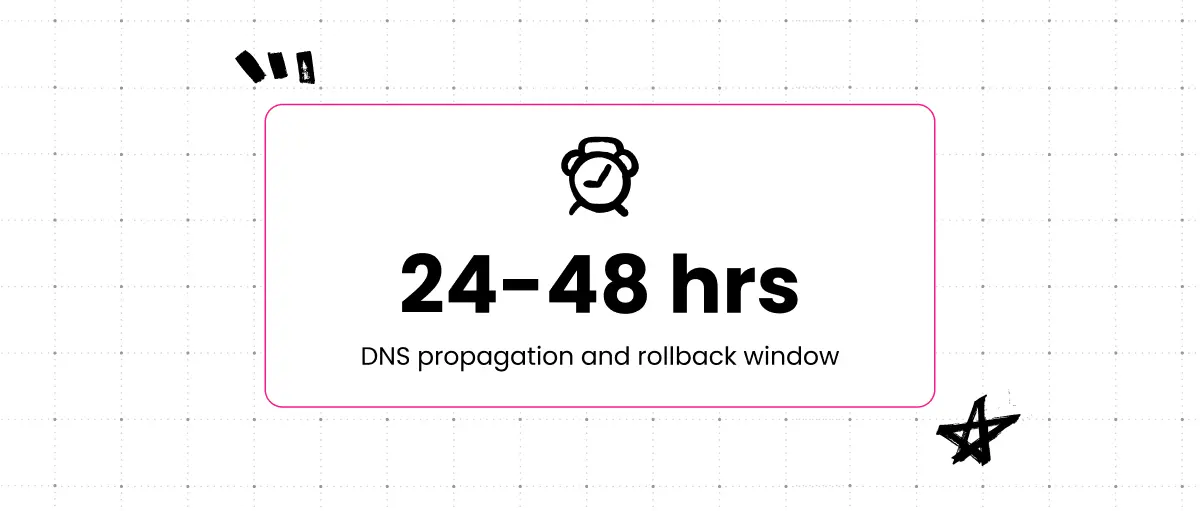
The cutover — pointing your domain to the new platform — is the most consequential single action in the entire migration. Lower your DNS TTL (time-to-live) 24–48 hours in advance to reduce propagation time when you make the switch.
DNS propagation is not instant. Different users will see the old site or the new site depending on their DNS resolver’s cache state. This window typically lasts 24–48 hours. Design your monitoring and response plan with this in mind. Keep the old system running for at least 24–48 hours post-cutover and maintain rollback capability until you’re confident the new platform is stable.
The first 72 hours post-launch require intensive, structured monitoring: organic traffic and conversion rates, server performance and error rates, 404 errors and redirect failures, Core Web Vitals, Search Console crawl status, and support ticket volume. Plan for 24/7 monitoring coverage for at least the first 48 hours with a defined on-call rotation. Establish severity levels before launch so the team knows what constitutes a P1 issue requiring immediate action versus a P3 that waits for the next sprint.
Optimize After Launch and Plan for Continuous Improvement
Monitor SEO Recovery and Accelerate Improvement
Some ranking fluctuation after migration is normal. Search engines need time to re-crawl and re-evaluate the site on the new platform. The goal of post-migration SEO work is to minimize that window and accelerate improvement.
Typical recovery timeline: Minor fluctuations in the first 2–4 weeks, stabilization by 4–8 weeks, full recovery or measured improvement by 8–12 weeks. Sites with significant technical debt on the old platform often see net improvement within this window, because better performance and cleaner architecture can yield ranking gains, not just preservation.
Active recovery steps: fix redirect errors and broken internal links immediately when discovered, submit priority pages for reindexing through Google Search Console, strengthen internal links to high-value pages that need faster re-crawling, and optimize underperforming pages using keyword data from the audit phase.
Clear Digital’s web experience team monitors SEO recovery post-launch and prioritizes optimization based on traffic and conversion impact rather than ranking position alone.
Train Users and Manage the Change
A CMS migration is only successful if the people who use the platform daily can work effectively in it. Technical delivery and user adoption are separate problems that require separate attention.
Role-based training matters: content authors, editors, administrators, and developers each need different instruction. Generic sessions that try to cover all roles simultaneously satisfy none of them. Plan for live workshops for initial training, recorded tutorials for reference and onboarding, a sandbox environment for hands-on practice, and office hours in the first 30 days.
Address resistance directly. It’s usually grounded in legitimate concerns about workflow disruption. Communicate the benefits of the new platform clearly and early. Celebrate early wins from teams that adapt quickly.
Knowledge transfer, not dependency, is the goal. Clear Digital’s approach to systems support ensures clients develop the internal capability to manage their platform independently, with ongoing support available through structured support subscription plans when needed.
Measure Success Against Baselines and Build a Continuous Improvement Roadmap
Migration is not the finish line. It’s the point at which the new platform’s capabilities become available to improve on what the old platform couldn’t do.
Compare all post-migration metrics against the baselines established in planning. Document lessons learned: what worked, what created friction, unexpected challenges. Prioritize the optimization opportunities surfaced during auditing and post-launch monitoring. Plan content enhancements, schedule platform updates, and enable personalization features in a structured rollout.
Modern CMS platforms are designed for continuous improvement. Clear Digital’s support subscription plans provide the ongoing partnership structure that keeps platform capability aligned with business needs. Our case studies show what this looks like in practice for B2B technology enterprises.
Common Enterprise CMS Migration Challenges — and How to Get Through Them
Stakeholder Alignment Across Large Organizations
The challenge: Multiple departments with competing priorities. Marketing wants speed. IT wants stability. Legal wants sign-off before anything publishes. Maintaining alignment over a 4–9 month timeline is genuinely hard.
What works: Executive sponsorship with real authority to resolve conflicts. Governance structures established at the start, not improvised when disputes arise. Regular communication that’s honest about progress, risks, and tradeoffs. Clear escalation paths that don’t require lengthy email chains to get a decision made. Milestone celebrations that maintain organizational energy over a long initiative.
Massive Content Volumes and Complex Architecture
The challenge: Enterprises with complex content architectures — technical documentation, multi-language content, product catalogs, compliance materials — often find that migration is far more complex than page count alone suggests. Content relationships, taxonomy structures, and custom field mapping add dimensions that don’t appear in a URL crawl.
What works: Robust automated migration scripts developed iteratively with thorough testing. A staged approach that limits the scope of any single migration phase. Dedicated content architecture planning before scripts are written. An experienced migration partner who has encountered the edge cases before.
Maintaining Business Continuity During a Long Migration
The challenge: The business doesn’t stop while you migrate. Campaigns run. Product launches happen. Content teams need to publish. All of this continues on the old platform while the new one is being built.
What works: Parallel operation of both systems through migration phases. Staged cutover by section rather than all-at-once. Content freeze protocols communicated early and clearly. Rapid response capability that can address issues within hours, not days.
The Tools That Support Enterprise CMS Migration
- Content auditing and crawling: Screaming Frog SEO Spider, Sitebulb, Lumar (formerly DeepCrawl) for very large or complex sites
- Migration automation: Custom Python or Node.js scripts for complex content models; platform-specific migration tools and services like CMS2CMS for simpler migrations
- Testing and QA: BrowserStack for cross-browser and device testing; Google Lighthouse and PageSpeed Insights for performance; JMeter or k6 for load testing; Axe or WAVE for accessibility
- SEO monitoring: Google Search Console (essential), Semrush or Ahrefs for rank tracking and technical auditing, redirect testing tools for validation at scale
- Analytics and infrastructure monitoring: Google Analytics 4, New Relic or Datadog for server performance, uptime monitoring with alerting, Sentry or Rollbar for error tracking post-launch
- Project management: Jira or Asana for task and dependency tracking, Confluence or Notion for documentation, Slack for launch-day coordination
Clear Digital has practical experience across this toolset through DXP and CMS platform work and custom development engagements, and recommends configurations appropriate to each client’s scale and existing infrastructure.
What Separates Successful Enterprise CMS Migrations From the Ones That Become Cautionary Tales
Enterprise CMS migrations are complex. They require sustained attention across multiple workstreams, careful coordination among teams with competing priorities, and technical execution that doesn’t tolerate shortcuts. But they are manageable with the right approach and the right partner.
The principles that matter most:
- Proper planning and auditing are not overhead. They are risk reduction.
- SEO preservation requires active effort at every phase, not just a redirect map at the end.
- Testing cannot be compressed without accepting equivalent risk.
- Migration is the start of continuous improvement, not the end of a project.
- The partner relationship matters. Implementation teams that act as extensions of your organization deliver meaningfully better outcomes.
Over 25+ years guiding B2B enterprises through complex platform transitions, Clear Digital has maintained a client retention rate above 90% in its core services. That continuity matters in migrations where institutional knowledge and long-term support often determine how well the new platform performs after launch.
Implementation teams that act as extensions of your organization deliver meaningfully better outcomes. For a closer look at what that looks like in a regulated, high-stakes migration, see our guide on Drupal to WordPress migration for healthcare enterprises.
CMS migration on your roadmap? Contact the Clear Digital team to start the conversation, explore our DXP and CMS platform services, or view enterprise case studies to see how we approach complex migrations for B2B technology companies.
Get our latest insights in your inbox
8 Criteria for Choosing a B2B Web Redesign Agency
Article
8 Criteria for Choosing a B2B Web Redesign Agency
By Clear Digital on September 15, 2026
Read moreWhat a B2B Website Redesign Requires From Your Team
Article
What a B2B Website Redesign Requires From Your Team
By Clear Digital on September 11, 2026
Read moreHow to Justify a Website Redesign to Your CEO, CFO, or Board
Article
How to Justify a Website Redesign to Your CEO, CFO, or Board
By Clear Digital on September 11, 2026
Read more