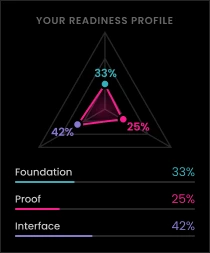
WordPress can achieve full HIPAA compliance — but it doesn’t arrive that way. Budget for specialized compliant hosting, vetted security plugins with BAAs, custom access control development, and ongoing compliance monitoring before you commit to the platform.

ArticleDXP & CMS Platforms
Drupal to WordPress Migration for Healthcare Enterprises: Key Considerations
For many healthcare enterprises, the Drupal question has become urgent. Drupal 7’s end-of-life forced a reckoning, and organizations that delayed are now weighing their options with real pressure behind the decision. Some are migrating to Drupal 10. Others are asking a more fundamental question: is this the moment to move to WordPress entirely?
It’s a reasonable question. WordPress has matured significantly, and the case for it — lower development costs, a more accessible content management experience, a vast plugin ecosystem, and an enormous developer talent pool — is genuinely compelling. But healthcare enterprises can’t evaluate this migration the way a retail brand or SaaS company might. When patient data, HIPAA compliance, EHR integrations, and 24/7 uptime are on the line, “move fast and iterate” is not a strategy. It’s a liability.
This guide is written for healthcare IT leaders, CTOs, and digital decision-makers who are seriously evaluating a Drupal to WordPress migration for healthcare. It won’t give you a generic step-by-step checklist. What it will do is walk you through the considerations that are unique to your industry — compliance continuity, security architecture, integration complexity, and operational risk — so you can make an informed decision and, if you proceed, execute it without compromising what matters most.
Clear Digital has spent over 25 years building digital experiences for healthcare organizations, and our DXP and CMS platform services are designed around those constraints. We’ve seen how much the stakes differ from other industries. This is a space where the cost of getting it wrong isn’t measured in lost traffic or conversion dips. It’s measured in regulatory fines, breached patient trust, and disrupted care. That context shapes everything that follows.
For more on Clear Digital’s healthcare expertise, visit our healthcare industry work and DXP and CMS platform services.
Why Healthcare Enterprises Consider Moving from Drupal to WordPress
The business case for WordPress is real, and dismissing it outright would be intellectually dishonest. Healthcare organizations face genuine operational pressures, and WordPress addresses several of them directly.
Development costs are a legitimate driver. Drupal requires specialized developers whose rates reflect the smaller talent pool. For healthcare organizations with constrained IT budgets — which describes many regional health systems, specialty practices, and mid-sized hospital groups — the cost differential is meaningful. WordPress developers are more widely available, and hourly rates are generally lower.
Content accessibility matters operationally. Healthcare communications teams need to move quickly. Updating provider availability, publishing health advisories, revising insurance acceptance information, or adding new patient resources shouldn’t require IT involvement for every edit. WordPress’s editorial interface makes that self-sufficiency genuinely achievable. Drupal, even in its current iterations, has a steeper learning curve for non-technical users.
The plugin ecosystem offers speed for common needs. Appointment scheduling, patient intake forms, newsletter management, and basic analytics integrations are all solvable with existing WordPress plugins — faster than custom Drupal module development.
Designer and developer flexibility is broader. For healthcare brands undergoing modernization or rebranding, WordPress’s theme and page builder ecosystem allows faster design iteration. This isn’t trivial for organizations trying to update a digital presence that reflects a new brand identity.
That said, every one of these advantages comes with a qualifier that healthcare organizations must take seriously. WordPress is not an enterprise healthcare CMS out of the box. The lower entry cost is real, but it’s often offset by what you’ll need to invest in security hardening, HIPAA-compliant hosting, custom development for healthcare-specific features, and ongoing compliance infrastructure. Organizations that budget for the WordPress license and ignore the compliance overhead tend to discover the true cost later, usually at an inconvenient moment.
The migration decision has to account for total cost of ownership, not just initial development spend.
Understanding Healthcare-Specific Migration Challenges
HIPAA Compliance Isn’t Optional — It’s Foundational
HIPAA compliance doesn’t pause during migration. It applies to every stage of the process: planning, data transfer, testing, and post-launch operations. This is where healthcare CMS migrations diverge most sharply from standard web projects.
Protected Health Information (PHI) is everywhere. Even basic contact information — a name linked to an appointment request, an email address associated with a patient portal account — is PHI if it connects an individual to a healthcare context. Every piece of PHI must be encrypted in transit and at rest throughout the migration process, and every system that touches that data must be evaluated for compliance risk.
Business Associate Agreements (BAAs) are required for every vendor in the chain. This includes your hosting provider, any migration tools or scripts, security plugins, and third-party services integrated into your WordPress environment. This is where WordPress’s plugin ecosystem gets complicated. Many popular plugins — even highly rated, widely used ones — do not offer BAAs. Healthcare organizations must vet every plugin before deployment and either find compliant alternatives or build custom solutions. This takes time and adds cost that is frequently underestimated.
Audit trail requirements don’t go away. HIPAA mandates documentation of who accessed what data and when. Drupal’s access logging capabilities are robust out of the box. WordPress requires additional plugins, custom configuration, and ongoing monitoring to meet the same standard.
Breach notification obligations are unforgiving. If PHI is compromised at any point during migration — even briefly, even due to a misconfigured staging environment — healthcare organizations face mandatory breach reporting obligations, potential fines up to $1.5 million per incident, and significant reputational exposure. Misconfigured migrations are one of the more common sources of healthcare data incidents.
User access controls require significant customization. The role-based permission needs of a healthcare environment — distinguishing between a physician’s access, a nurse’s access, an administrative coordinator’s access, and a patient’s access — go well beyond WordPress’s default user roles. Healthcare WordPress implementations require custom role architecture and access controls that align with the minimum necessary access principle required under HIPAA.
Security Requirements Go Beyond Standard Websites
Healthcare records carry significant value on the dark web — substantially more per record than financial data — which makes healthcare organizations high-priority targets for cyberattacks. This isn’t speculation; it’s a pattern documented in healthcare breach reports year over year.
WordPress’s popularity is an asset in many respects, but it also makes it a frequent attack surface. The platform’s ubiquity means attackers actively research WordPress vulnerabilities, and the plugin ecosystem introduces risk vectors that don’t exist in more controlled platform environments.
A healthcare WordPress implementation requires a security posture that goes well beyond a standard installation:
-
- Web Application Firewall (WAF) to filter malicious traffic before it reaches your application layer
- Two-factor authentication (2FA) enforced for any user with administrative access or access to PHI
- Database encryption for patient data at rest, requiring specific hosting configurations
- Continuous vulnerability management with defined processes for monitoring, testing, and applying security patches rapidly
- Third-party penetration testing before launch and at regular intervals post-launch
- Secure development standards (OWASP guidelines) written into any agency or contractor engagement
By contrast, Drupal was architected with enterprise security as a primary design consideration. It powers U.S. government websites, financial institutions, and large healthcare systems for exactly this reason. Drupal’s security model is built in; WordPress’s must be built on top. Both can reach the same destination, but the path and ongoing investment are meaningfully different.
Integration Complexity with Healthcare Systems
Healthcare websites are rarely standalone. They’re nodes in a broader ecosystem of clinical, operational, and administrative systems. That integration complexity is one of the most underestimated dimensions of any healthcare CMS migration.
EHR integrations are mission-critical and technically demanding. Whether your organization runs Epic, Cerner, Allscripts, or another platform, the connections between your website and your EHR handle real clinical workflows. Drupal’s API framework manages these integrations with established, well-tested modules. WordPress can support EHR integrations, but they typically require custom API development, which adds cost, timeline, and risk, especially if the integration handles PHI.
Patient portals carry the highest stakes. Secure login, test result access, appointment scheduling, provider messaging — these aren’t features you can approximate. They require sophisticated authentication, rigorous data security, and reliable uptime. Rebuilding patient portal functionality in WordPress is achievable, but it demands significant custom development, extensive testing, and a security review before any patient data touches the new environment.
Practice management and administrative systems need to stay connected. Billing, scheduling, and operational workflows can’t be interrupted during migration. A phased approach that maintains existing integrations while the new environment is built and tested is almost always the right call.
SSO, HL7, and FHIR add layers. Single sign-on for staff across multiple systems, and modern interoperability standards like HL7 FHIR, require careful planning in a WordPress context. Drupal has established modules for these protocols. WordPress implementations need custom development and thorough integration testing to reach the same level of reliability.
Clear Digital’s technology integration services address exactly this complexity, helping healthcare organizations map their integration dependencies before migration begins, not after.
Pre-Migration Planning: Healthcare-Specific Considerations
Conducting a Healthcare Migration Readiness Assessment
In healthcare migrations, planning is where projects succeed or fail. The technical execution matters, but it has to be grounded in a thorough understanding of your current environment, compliance status, and organizational requirements.
A healthcare migration readiness assessment covers several layers:
Compliance audit. Document your current HIPAA compliance posture. Identify every system that handles PHI. Review existing BAAs to understand which vendor relationships will need to be re-established or renegotiated in a WordPress environment. Assess your current security monitoring and incident response capabilities.
Technical inventory. Catalog every Drupal module in use, including custom modules that have no direct WordPress equivalent. Document every third-party integration: APIs, data feeds, authentication services, and embedded tools. Assess content volume and complexity, including structured content types that will need to be mapped to WordPress equivalents.
Stakeholder requirements gathering. A healthcare migration touches more stakeholders than most organizations initially anticipate. Clinical staff care about workflow continuity. Compliance officers care about regulatory risk. Marketing teams care about content management flexibility. IT security teams care about vulnerability management. Executive leadership cares about cost, timeline, and reputational risk. All of these perspectives need to be captured before architecture decisions are made.
Risk assessment. Identify the scenarios that would constitute failure: PHI exposure during migration, integration downtime, compliance gaps, SEO loss for patient-facing content. For each risk, define the mitigation approach before work begins.
Budget reality check. Factor in HIPAA-compliant hosting premiums, security plugin costs, custom development for healthcare features, penetration testing fees, compliance monitoring tools, and ongoing maintenance requirements. Organizations that budget only for migration execution often discover mid-project that the compliance and security infrastructure they need costs more than anticipated.
| Factor | Drupal Advantage | WordPress Advantage |
|---|---|---|
| Out-of-box security | ✓ Enterprise-grade | Requires hardening |
| HIPAA compliance | ✓ Built-in features | Requires investment |
| Content management | Technical learning curve | ✓ Intuitive interface |
| Development cost | Higher hourly rates | ✓ Lower costs |
| Integration capabilities | ✓ Robust APIs | Custom development needed |
| Long-term maintenance | Lower update frequency | Higher update frequency |
| Scalability | ✓ Enterprise-ready | Requires optimization |
| Developer availability | Limited talent pool | ✓ Large talent pool |
Assembling the Right Migration Team
A healthcare CMS migration is not a standard web project, and staffing it like one is a common and costly mistake.
The team you need includes people whose expertise spans both the technical and the regulatory:
- A healthcare IT security specialist who understands HIPAA’s technical safeguards and can architect a compliant WordPress infrastructure from the ground up
- A WordPress developer with demonstrated healthcare experience who understands secure development practices and knows which plugins carry compliance risk
- A project manager with a healthcare background who can anticipate risk points that a generalist would miss
- Active compliance officer involvement from the planning stage forward, not after architecture decisions are already made
- Clinical stakeholder representation to ensure patient-facing features reflect actual provider and patient workflows
The build-versus-partner decision is worth taking seriously. Internal teams with deep healthcare IT expertise can execute migrations successfully, but the combination of HIPAA compliance knowledge, WordPress security architecture, and healthcare integration experience is genuinely specialized. Agencies like Clear Digital that bring all of these capabilities under one roof reduce coordination risk and often shorten timelines. The custom web development work we do for healthcare clients reflects this integrated approach.
The Healthcare Migration Process: Step-by-Step
Phase 1: Secure Environment Setup
Before any data moves, the destination environment has to be built to healthcare standards.
HIPAA-compliant hosting selection is the foundational decision. Not every managed WordPress host offers the compliance infrastructure healthcare requires. What you need: a signed BAA, encryption at rest and in transit, regular third-party security audits, documented backup and disaster recovery procedures, 99.9%+ uptime guarantees, and 24/7 security monitoring. A shortlist of hosting providers should be evaluated against these criteria before any other infrastructure work begins.
Staging environment configuration should mirror production security controls precisely. A staging environment that lacks the security architecture of production will produce testing results that don’t reflect real-world conditions and may inadvertently expose data during the testing process.
Security plugin installation and configuration covers the core security stack: a WAF, intrusion detection and monitoring, two-factor authentication enforcement, activity logging for HIPAA audit trail requirements, and database encryption. Each plugin used in a PHI-adjacent context requires a BAA.
Role-based access control should be implemented and validated before any migration activity begins. Define which users have access to which systems and data, configure minimum necessary access, and establish secure authentication for all administrative functions.
Phase 2: Content and Data Migration
This phase carries the highest compliance risk, and it requires the most rigorous controls.
PHI identification precedes everything else. Before any content moves, audit your Drupal content environment to identify every piece of PHI, including content that may not be obviously sensitive but that associates individuals with healthcare contexts. Implement encryption for all PHI during transfer and maintain audit logs of every data access event during the migration process.
Migration tool selection matters. Tools like the FG Drupal to WordPress plugin can handle bulk content migration efficiently, but their use in healthcare contexts requires security review and, where applicable, BAA coverage. For the most sensitive content categories, manual migration with enhanced validation is often the right call — slower, but more controllable.
Content structure mapping involves translating Drupal’s content types, taxonomies, and relationships into WordPress equivalents. This is rarely a clean one-to-one mapping, particularly for structured healthcare content like provider profiles, condition pages, or service line content that may have complex relational architecture in Drupal.
User data migration deserves special handling. Migrating user accounts means migrating PHI. Establish a clear protocol: migrate accounts, force password resets on first login, and enforce 2FA enrollment for all users with access to PHI or administrative functions. Don’t carry over authentication credentials from the old environment.
SEO structure preservation is operationally important for patient-facing content. Healthcare organizations depend on organic search visibility for appointment-driving content: condition pages, provider directories, location pages. Meticulous URL mapping and 301 redirect implementation protects that visibility during the transition.
Phase 3: Functionality Replication and Enhancement
Healthcare websites carry features that don’t have direct WordPress equivalents and can’t be approximated with standard plugins.
Patient portal reconstruction is the highest-stakes piece of functional work. Secure authentication, test result access with proper authorization controls, appointment scheduling, and provider messaging all need to be rebuilt, not just replicated. Use this as an opportunity to evaluate whether the patient portal functionality was meeting clinical and patient needs, and where it could be improved.
Provider directories and profiles need to be accurate, structured, and connected to appointment booking workflows. These pages drive significant patient acquisition for healthcare organizations; any disruption to their structure or search visibility has measurable downstream effects.
Healthcare-specific forms — patient intake, referral requests, symptom screeners — require HIPAA-compliant form plugins with secure data transmission and integration to downstream systems. Standard WordPress contact form plugins are not appropriate for PHI collection.
Appointment scheduling integrations need to be rebuilt and tested against live practice management data before launch. These integrations are patient-facing and operationally critical; any failure here affects care access.
Phase 4: Security Hardening and Compliance Validation
This phase should not be abbreviated under timeline pressure. It’s where you verify that what you’ve built actually meets the requirements you committed to at the start.
A third-party security assessment, including vulnerability scanning and penetration testing, is standard practice for healthcare WordPress implementations. Internal review alone is not sufficient, both because it lacks objectivity and because regulators expect documented third-party validation.
HIPAA compliance validation should be formal and documented. Review technical safeguards, administrative controls, and physical security measures. Produce documentation that demonstrates compliance — this becomes part of your compliance record and is essential if you’re ever audited.
Performance and load testing under realistic traffic conditions validates that the site meets uptime requirements. Patient portals in particular should be tested under concurrent user load that reflects peak usage periods. Disaster recovery testing confirms that backup and recovery procedures work as documented. The time to discover that your backup strategy has gaps is not during an incident.
Phase 5: Controlled Launch with Minimal Disruption
Go-live for healthcare sites requires a different approach than consumer or B2B software launches.
A phased rollout reduces risk substantially. Launching the public-facing marketing site first — provider information, service line pages, location content — while keeping the patient portal on the existing environment allows you to validate stability before moving the highest-stakes functionality. This approach extends the timeline but reduces the blast radius of any issues that surface post-launch.
Zero-downtime DNS management handles the cutover without patient-visible interruption. Plan the cutover window carefully, communicate any required maintenance windows in advance, and have rollback procedures documented and ready to execute.
Post-launch monitoring for the first 72 hours should be intensive: 24/7 security monitoring, application performance monitoring, and dedicated support coverage for patient and staff issues. Issues discovered in this window are recoverable; issues discovered after the monitoring intensity drops are harder to contain.
Clear Digital’s web experiences and systems support services support healthcare organizations through exactly this launch and stabilization process.
Post-Migration: Maintaining Security and Compliance
Continuous Security Monitoring and Updates
Migration completion does not mark the end of compliance responsibility. In some respects, ongoing operations carry more risk than the migration itself, because organizations often relax vigilance once the project is declared done.
WordPress requires a disciplined update management process. Core updates, theme updates, and plugin updates each carry risk: security vulnerabilities and functional regressions. Healthcare organizations need a defined process for monitoring updates, testing in staging, and deploying to production rapidly when security patches are involved. A security patch that sits undeployed for two weeks because it hasn’t been tested yet is a liability.
Continuous security monitoring — intrusion detection, activity log review, vulnerability scanning — should be treated as an operational cost of running a HIPAA-regulated WordPress environment, not as an optional enhancement. Annual HIPAA risk assessments and regular compliance documentation updates are required, not discretionary.
Performance Optimization for Healthcare
Uptime monitoring with automated alerting is table stakes for healthcare. When patient-facing tools go down, access to care information is disrupted. Monitoring intervals should be short — minutes, not hours — and alert routing should reach people who can act immediately.
Page load performance matters beyond user experience. Slow load times for patient-facing content affect both patient satisfaction and search visibility. Healthcare organizations should establish performance baselines at launch and monitor against them continuously.
Scalability planning accounts for growth — new locations, new service lines, increased patient portal adoption — before it creates performance problems. Reactive infrastructure scaling is more expensive and more disruptive than proactive capacity planning.
Support and Maintenance Planning
Healthcare WordPress environments need dedicated, ongoing support, not just reactive break-fix coverage. The complexity of HIPAA requirements, integration dependencies, and continuous security obligations means that ad hoc support arrangements tend to leave gaps.
Clear Digital’s support subscription plans are structured for exactly this kind of ongoing relationship, providing healthcare organizations with defined response times, proactive monitoring, and a team that understands the compliance context of the environment they’re supporting.
Staff training on WordPress administration, security procedure documentation, and compliance policy updates should be part of the post-migration plan, not afterthoughts. Your marketing team’s ability to manage content independently is one of the reasons you moved to WordPress; investing in their training protects that value.
Making the Decision: Is WordPress Right for Your Healthcare Enterprise?
When WordPress Makes Sense for Healthcare
WordPress is a legitimate choice for healthcare organizations in specific situations. The migration makes strategic sense when:
- You’re a small to mid-sized practice or health system (1-10 locations) with straightforward content management needs and limited IT complexity
- Your marketing and communications team needs content publishing autonomy and current Drupal workflows create bottlenecks
- Your EHR integrations and patient portal requirements are limited in scope and can be addressed with custom development
- Your IT budget favors a lower-cost development environment, and you’re prepared to invest in the security and compliance infrastructure the platform requires
- You’re undergoing a brand modernization or digital transformation where design flexibility is a strategic priority
When Staying with Drupal (or Upgrading to Drupal 10) Is Smarter
There are healthcare contexts where Drupal remains the right answer. A platform-agnostic assessment acknowledges this:
- Large health systems with multi-site architectures, complex governance models, and sophisticated user permission requirements
- Organizations with significant patient portal dependencies and deep EHR integration requirements that would require extensive custom WordPress development to replicate
- Enterprises that handle large volumes of PHI across multiple clinical systems and need Drupal’s security architecture to support that complexity
- Organizations with existing internal Drupal expertise and a platform that is performing well; migration for its own sake rarely makes business sense
The Drupal 10 upgrade path is a legitimate alternative to migration. For organizations facing Drupal 7 end-of-life pressure but uncertain WordPress is the right destination, upgrading within the Drupal ecosystem preserves existing investment and capabilities while moving to a supported, actively developed platform.
The Hybrid Approach: When to Consider It
Some healthcare organizations find that neither a full migration nor full retention of Drupal addresses their needs cleanly. A hybrid architecture has real-world applications:
- Marketing site on WordPress, patient portal on Drupal: Captures content management advantages for the communications team while maintaining Drupal’s security architecture for clinical functions
- Phased migration with evaluation gates: Move marketing content first, assess stability, then make a data-informed decision about whether patient portal migration is warranted
- Headless architecture: Using Drupal as the data and content management layer with a decoupled front end allows organizations to leverage Drupal’s security and API capabilities while gaining more design flexibility — though it carries more technical complexity than either pure-platform option
Partnering for Healthcare Migration Success
The risk profile of a healthcare CMS migration is meaningfully higher than most web projects. The combination of regulatory complexity, security requirements, integration dependencies, and uptime expectations makes this an area where the wrong partner — or the wrong decision to go it alone — has consequences that extend well beyond a failed project.
Clear Digital brings 25+ years of digital experience to this work, with a track record in healthcare that reflects an understanding of what’s actually at stake. Our approach is platform-agnostic: we recommend the right solution for each organization’s requirements, not the one that’s easiest to sell. When WordPress is the right answer, we build it with the security and compliance infrastructure healthcare demands. When Drupal is the better fit, we say so.
The capabilities that matter most for healthcare migrations are not generic digital agency capabilities. They’re specific: healthcare compliance knowledge, security architecture experience, understanding of clinical workflows and integration requirements, and a project management approach built around risk mitigation. Clear Digital’s DXP and CMS platform services reflect this specialization, and our case studies demonstrate how we’ve applied it across the healthcare industry.
Partnership makes the most sense when the stakes are high, internal expertise is limited, or the timeline requires efficient execution without a learning curve. If you’re evaluating a healthcare CMS migration and want a candid conversation about what it would actually require, we’re a straightforward conversation away.
Key Takeaways: Healthcare CMS Migration Essentials
Security and compliance are non-negotiable costs of the platform. WordPress is HIPAA-achievable, not HIPAA-ready. Budget for compliant hosting, security infrastructure, and ongoing monitoring before committing to the migration.
Healthcare migrations are categorically more complex than standard web projects. Patient portals, EHR integrations, and 24/7 uptime requirements demand specialized expertise. A team without healthcare-specific experience will encounter these requirements as surprises rather than planning inputs.
Planning is where the project succeeds or fails. A thorough readiness assessment, honest stakeholder engagement, and rigorous risk mitigation planning are not overhead — they’re the work.
Total cost of ownership is the right frame for the financial decision. WordPress’s lower entry cost is real, but it doesn’t reflect the compliance infrastructure, security hardening, and custom development healthcare implementations require. The 5-year number is the one that matters.
The right platform depends on your specific situation. WordPress isn’t inherently better or worse than Drupal for healthcare. The decision should be made against your organization’s actual requirements, resources, and growth trajectory, not market trends or vendor recommendations.
Experienced partnership compresses risk and timeline. Healthcare enterprises that partner with agencies with healthcare-specific compliance and security expertise consistently experience fewer compliance gaps, fewer integration failures, and more predictable go-live timelines.
Ready to talk through your migration? Contact the Clear Digital team or explore our healthcare work to see how we approach complex digital challenges in the industry.
Get our latest insights in your inbox
8 Criteria for Choosing a B2B Web Redesign Agency
Article
8 Criteria for Choosing a B2B Web Redesign Agency
By Clear Digital on September 15, 2026
Read moreWhat a B2B Website Redesign Requires From Your Team
Article
What a B2B Website Redesign Requires From Your Team
By Clear Digital on September 11, 2026
Read moreHow to Justify a Website Redesign to Your CEO, CFO, or Board
Article
How to Justify a Website Redesign to Your CEO, CFO, or Board
By Clear Digital on September 11, 2026
Read more