The advantage: cost and flexibility. The trade-off: compliance responsibility falls entirely on your implementation and hosting choices.

There is no such thing as a HIPAA-compliant CMS. That reality frustrates marketing and technology leaders searching for a simple software solution to meet regulatory requirements. The search term implies you can license compliance as a product feature, but you can’t. Compliance is a system of architectural controls, legal agreements, and ongoing governance that spans your CMS, hosting infrastructure, and implementation practices.
The better question: which combination of software, hosting provider, and implementation partner can build and maintain a system that meets HIPAA’s Security Rule and Privacy Rule requirements for protecting Protected Health Information?
This article provides that practical framework—a comparison of CMS platforms based on implementation effort, an analysis of hosting requirements, and the specific steps that turn software into a compliant system.
Compliance is Architectural: The Shared Responsibility Model
HIPAA’s Security Rule requires administrative, physical, and technical safeguards for electronic PHI, and the Privacy Rule governs how PHI can be used and disclosed. Neither rule certifies software. Both require you to implement and maintain controls across your entire technology stack.
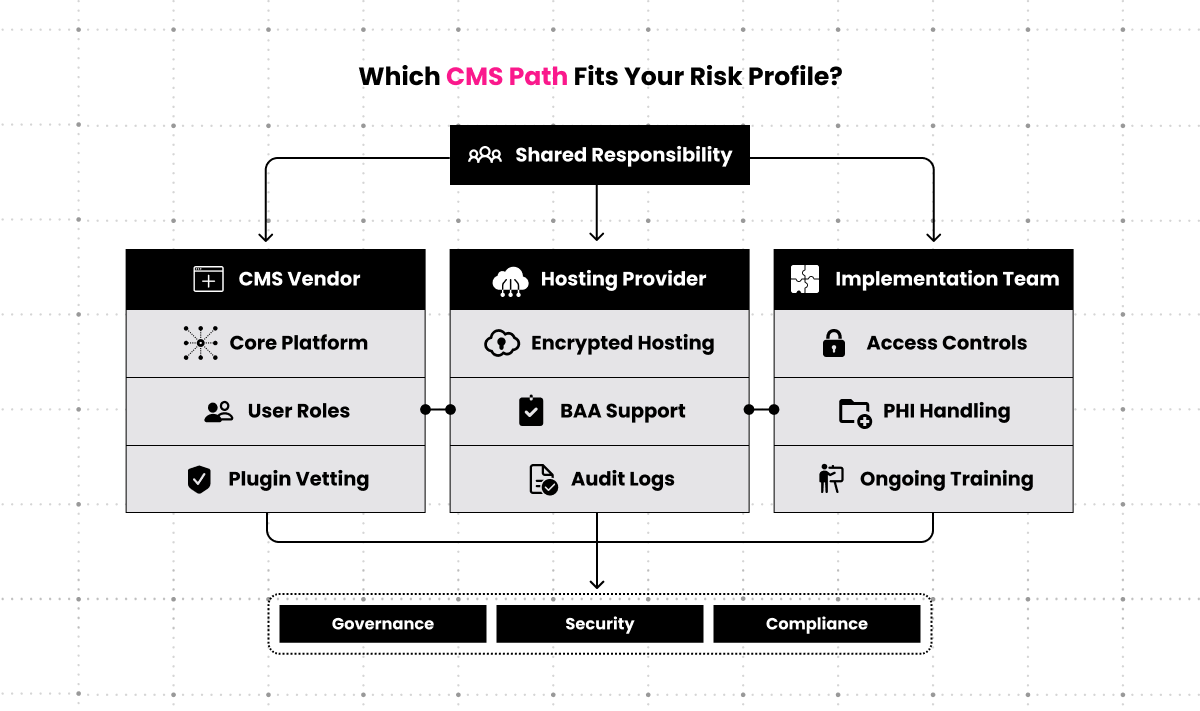
Three parties share responsibility:
- Software vendor: Provides the CMS and security features such as role-based access control and audit logging.
- Hosting provider: Supplies the infrastructure and must sign a Business Associate Agreement (BAA) accepting responsibility for safeguarding PHI at the server and network level.
- Implementation partner / internal team: Configures the software, enforces policies, manages user access, and ensures the entire system operates within HIPAA’s requirements.
The gap between vendor promises and operational reality is where violations occur. A CMS may support encryption, but if your team doesn’t enable it correctly or your hosting environment lacks encrypted storage, you’ve created a compliance failure. The vendor’s responsibility ends at providing capable tools; your responsibility includes everything from securing a BAA to patching vulnerabilities on time and training staff on PHI handling procedures.
Clear Digital works with hospitals, clinics, and healthtech companies to design and implement healthcare websites and digital experiences that account for regulatory requirements, accessibility, and complex provider workflows. Our approach to CMS implementation for healthcare organizations ensures the technology infrastructure supports both patient engagement goals and the compliance obligations unique to the healthcare industry.
Non-Negotiable Requirements for PHI Management
At a minimum, every HIPAA-sensitive implementation needs three building blocks in place:
- Business Associate Agreement (BAA): Your hosting provider must sign a BAA acknowledging they handle PHI and accept liability for safeguarding it. No BAA means no compliance, regardless of how secure your CMS configuration appears. Many popular hosting providers, including standard shared hosting services, won’t sign a BAA, which immediately disqualifies them.
- Encryption: PHI must be encrypted at rest in your databases using AES-256 or equivalent standards, and encrypted in transit using TLS 1.2 or higher for all connections. This applies to CMS admin access, API calls, and any public-facing forms that collect PHI. Encryption isn’t optional under the Security Rule and is often the first control auditors examine.
- Audit logs and access control: You need immutable, timestamped logs of every action involving PHI—who accessed what data, when, from which IP address, and what changed. Your CMS must support granular role-based permissions that limit access to the minimum necessary for each user’s job. Default administrator roles are almost never compliant because they grant excessive access.
These requirements exist before you write a single line of content or design a single page template.
Top HIPAA-Compliant CMS Platforms Compared
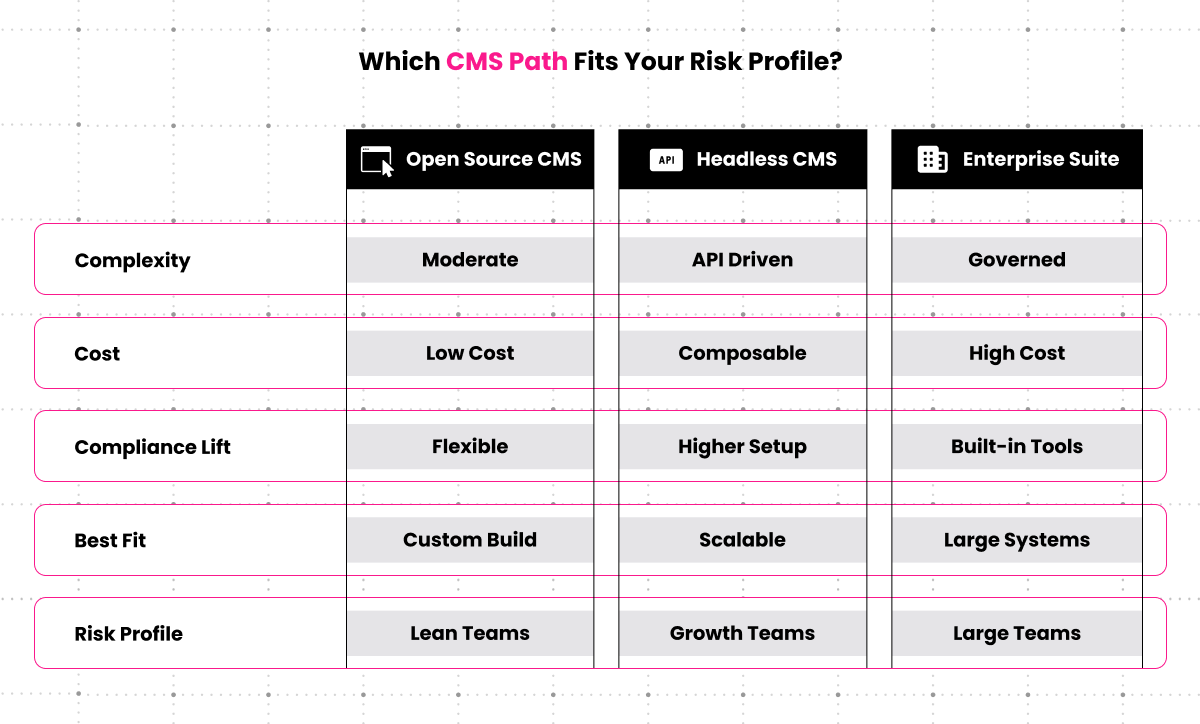
Which HIPAA-compliant CMS approach fits your team?
The “best” platform depends on your budget, technical resources, and the volume and sensitivity of PHI you’re managing. This comparison focuses on implementation effort and architectural considerations, not marketing claims.
Use this table as a directional guide to effort and investment levels, not a quote.
| Platform Type | Implementation Complexity | Typical Investment Level | Primary Compliance Challenge | Best For |
|---|---|---|---|---|
| WordPress / Drupal | Medium–High | Five-figure initial investment | Security hardening & plugin management | Organizations with existing open-source expertise |
| Headless (Contentful, Contentstack) | High | High five- to low six-figure initial investment | API security & custom front-end development | High PHI volume or EHR integration needs |
| Enterprise (Sitecore, AEM) | Very High | Six-figure annual investment | Configuration complexity & licensing costs | Large healthcare systems needing full marketing automation |
WordPress and Drupal: The Open-Source Path
WordPress and Drupal dominate the open-source CMS market and can be configured for HIPAA compliance, but neither arrives compliant out of the box.
The primary challenge teams underestimate: ongoing security maintenance becomes a dedicated operational responsibility, not a one-time project.
WordPress needs specific plugins for user role management beyond its basic capabilities, PHI redaction in logs, and API endpoint lockdown. You’ll disable features that create compliance risk—public REST API endpoints, comment systems that store user data, and any plugins that haven’t been vetted for security vulnerabilities. A Web Application Firewall becomes mandatory. The plugin ecosystem that makes WordPress flexible also creates constant vigilance requirements. Every plugin update needs security review before deployment.
Drupal offers more granular permission controls from installation and maintains a security-focused community, but it still requires dedicated security modules, regular core updates within strict timeframes, and careful management of contributed modules. The smaller plugin ecosystem means fewer security concerns but also fewer pre-built solutions for common compliance needs.
There’s no vendor support line for HIPAA questions, and no one to blame if a plugin vulnerability creates a breach pathway.
The Headless Advantage: Contentful, Contentstack, and Similar Platforms
Modern headless CMS platforms offer an architectural advantage for compliance by fundamentally separating content management from content delivery.
Editors work in a secure, authenticated API-driven interface. Your public website or application fetches content through controlled API calls, creating a natural barrier between PHI and public exposure.
This architecture minimizes the attack surface. There’s no public-facing administrative login page to target, no WordPress admin dashboard accessible from the internet, and no monolithic application handling both content editing and public delivery.
You can lock down the content API to specific IP ranges, implement token-based authentication, and route all PHI through a separate, secured API layer.
In our work with healthcare technology companies, the headless approach proves most effective when patient data flows through the system regularly or when integrating with EHR platforms. The additional development effort pays for itself in reduced compliance risk and cleaner security boundaries.
The consideration: you’re building a custom system rather than configuring a pre-built one. This requires front-end development resources, careful API gateway design, and a separate hosting environment for your presentation layer.
Proprietary and Enterprise Suites: Sitecore, Adobe Experience Manager
Enterprise platforms like Sitecore and Adobe Experience Manager can achieve compliance, but they introduce substantial licensing costs and require dedicated infrastructure. These systems offer enterprise-grade support, built-in tools for access control and audit logging, and vendor accountability through formal support agreements.
Implementation and hosting costs typically exceed six figures annually. Organizations choose these platforms when they need the full marketing automation, personalization, and content management capabilities these suites provide—not solely for compliance.
If your primary need is HIPAA compliance for basic content management, the cost rarely justifies the investment. These platforms make sense for large health systems managing multiple sites, complex personalization requirements, and integration with existing enterprise systems.
Clear Digital has extensive experience with enterprise CMS and DXP platforms including Acquia, Adobe AEM, and Contentstack. We are platform-agnostic and tailor recommendations based on your organization’s specific needs, technical environment, and business requirements rather than vendor relationships. Our CMS and DXP services include platform selection, configuration, content migration, system integration, security hardening, and ongoing optimization.
Specific Implementation Steps for Compliance
Compliance emerges from specific configuration choices, not platform selection alone.
For WordPress or Drupal, implementation typically includes:
- Installing and configuring security plugins that enforce two-factor authentication.
- Deploying a Web Application Firewall (WAF) to filter malicious traffic.
- Disabling all public-facing APIs that aren’t essential to site function.
- Implementing PHI redaction in system logs so sensitive data never appears in error messages or activity records.
- Establishing a patch management schedule that applies security updates within 48–72 hours of release.
For headless platforms, compliance typically requires:
- Designing an authorized API gateway that validates all requests.
- Implementing token-based authentication with short expiration windows.
- Ensuring PHI is routed through a single, secured API layer rather than scattered across multiple endpoints.
- Maintaining strict separation between your public content delivery network and your authenticated content management environment.
Every platform also requires documented security policies, staff training on PHI handling, regular security assessments, and an incident response plan. The CMS is one component of a larger compliance program.
The Linchpin of Compliance: HIPAA-Compliant Web Hosting
Your HIPAA-compliant web hosting environment matters more to compliance than your CMS choice. The hosting provider controls physical security, network architecture, backup procedures, and access to the servers where your data resides.
A compliant hosting provider must offer and document:
- Signed BAA that explicitly covers your hosting environment and all associated services (CDN, backups, monitoring tools).
- Encrypted storage at the disk level, not just at the application level, ensuring data is protected even if physical drives are compromised.
- Segregated infrastructure that isolates your environment from other customers, eliminating shared-resource risks.
- Comprehensive audit logging that tracks all administrative access to servers, databases, and network resources with immutable, timestamped records.
- Disaster recovery and backup systems with documented procedures for restoring data and specific Recovery Time Objectives that meet your business requirements.
Standard cloud platforms like AWS, Azure, and Google Cloud can support HIPAA compliance, but the platform itself isn’t compliant. You must configure services correctly, enable the right security features, and work with the provider to execute a BAA that covers your specific service usage.
Organizations frequently discover mid-implementation that they’ve been using non-compliant services within an otherwise compliant environment—a cache layer that doesn’t support encryption, a logging service that lacks a BAA, or a CDN configuration that stores sensitive data outside the compliant infrastructure.
Managed WordPress hosts, even premium ones, rarely offer true HIPAA compliance. Shared hosting environments are categorically non-compliant because you cannot guarantee the physical and logical separation required by the Security Rule.
Clear Digital’s approach to secure hosting includes evaluating providers for necessary security controls, ensuring proper infrastructure configuration, and implementing advanced security measures to protect websites and data. We work with healthcare clients to select and configure hosting environments that align with their compliance requirements, technical needs, and performance goals.
EHR Integration and Secure API Architecture
EHR integration is where many “HIPAA-compliant” setups fall apart.
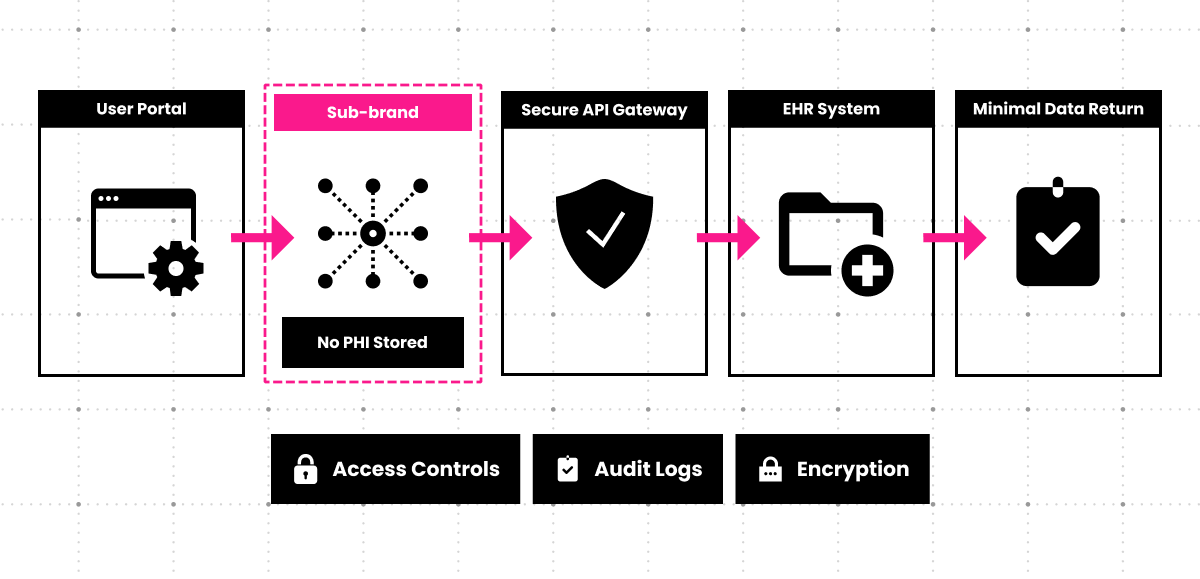
For healthcare organizations, the CMS often needs to integrate with Electronic Health Record systems like Epic or Cerner to power patient portals, appointment scheduling, or treatment information displays. This integration presents the highest-risk compliance scenario.
The challenge: creating a secure bridge between your public-facing CMS and the highly protected EHR environment.
- Direct database connections are unacceptable.
- File-based synchronization creates audit and access control gaps.
- The only viable approach is a secure, tokenized API gateway that authenticates every request, validates permissions, logs all data exchanges, and minimizes the PHI that passes through the public-facing system.
Best practice involves keeping PHI within the EHR system and using the CMS solely for authentication and display logic. When a patient logs into a portal, the CMS authenticates their identity and passes a secure token to the EHR’s API.
The EHR returns only the data necessary for that specific view. The CMS never stores PHI in its database, eliminating an entire category of compliance risk.
This architecture requires specialized development expertise and careful coordination between your CMS implementation team, EHR vendor, and security officers. Organizations that attempt to build these integrations without deep technical knowledge create exactly the kind of vulnerabilities that lead to breach notifications and regulatory penalties.
HIPAA Compliance Checklist
If even one of these items is missing, auditors will notice—and so will breach investigators if something goes wrong.
- Signed BAA from hosting provider covering all services in your infrastructure stack.
- PHI encrypted at rest using AES-256 or higher in all databases and file storage.
- All API endpoints tokenized and audited with immutable access logs.
- Two-factor authentication (2FA) mandatory for all CMS administrative accounts.
- Role-based access controls implemented, limiting user permissions to minimum necessary.
- Disaster recovery plan documented and tested with defined RTOs.
- Security patch management policy established with maximum timeframes for applying updates.
- Annual penetration testing scheduled by a qualified third-party security firm.
- Incident response plan documented with defined breach notification procedures.
- Staff training completed on PHI handling and CMS security procedures.
- PHI redaction implemented in all system logs, error messages, and debugging tools.
- Regular compliance audits scheduled to review configurations and procedures.
Frequently Asked Questions
Is AWS/Azure/Google Cloud inherently HIPAA compliant?
No. These platforms offer HIPAA-eligible services and will sign a BAA, but compliance requires correct configuration. You must enable encryption, configure access controls, implement logging, and ensure every service you use is covered under your BAA. Many organizations unknowingly use non-compliant services within a compliant platform.
Can I use shared hosting for my CMS if it handles PHI?
No. Shared hosting environments cannot provide the physical and logical separation HIPAA requires. You need dedicated or isolated infrastructure where you control access and can guarantee other customers’ activities don’t create security risks for your data.
What does compliance cost compared to a standard setup?
Expect 40–60% higher hosting costs due to dedicated infrastructure, BAA fees, and enhanced security services. Implementation costs increase 30–50% for compliance. Ongoing maintenance costs rise due to more frequent security reviews and stricter patch management.
How often do we need to patch our CMS for compliance?
Critical security patches must be applied within 48–72 hours. Non-critical updates should follow within 30 days. You need documented procedures for emergency patching and scheduled maintenance windows that don’t leave known vulnerabilities unaddressed.
Can our main website handle PHI, or do we need a separate patient portal?
It depends on volume and use case. For simple contact forms collecting basic information, a properly secured main site can work. For ongoing patient interactions, treatment information, or EHR integration, a separate portal with stronger authentication and access controls is safer.
What is the biggest HIPAA fine associated with a website data breach?
Fines range from thousands to millions depending on violation severity and scope. Anthem’s 2015 breach resulted in a $16 million settlement. The financial penalty is often less damaging than the reputational harm and loss of patient trust that follows a publicized breach.
Building Trust Through Compliance
The best HIPAA-compliant CMS isn’t a product. It’s a system built through expert implementation, secure hosting architecture, and ongoing governance. The platform you choose matters less than how you configure it, where you host it, and who manages it.
Consider the common failure pattern: an organization selects WordPress because it’s familiar and cost-effective, configures basic security settings, and launches a patient resource center with appointment request forms. Six months later, a routine security audit reveals the contact form data is being stored in an unencrypted database, three plugins haven’t been updated in four months and have known vulnerabilities, and the hosting provider never signed a BAA. The organization now faces either a costly emergency rebuild or operating with known compliance gaps until they can budget a proper implementation.
Compliance protects more than data. It protects the patient relationships and professional reputation your organization has spent years building. A single breach notification can destroy trust that took decades to establish.
Clear Digital brings 25+ years of experience designing and implementing secure digital solutions for B2B technology companies across regulated industries. Our expertise spans CMS implementation, DXP solution design, technology integration, security hardening, and ongoing platform optimization. We help organizations navigate complex technical and regulatory requirements while building digital experiences that drive engagement and measurable business results.
Technology and compliance leaders who understand the shared responsibility model make better platform decisions, ask better questions of vendors, and build systems that genuinely protect the people whose information they’re trusted to manage.
Get our latest insights in your inbox
8 Criteria for Choosing a B2B Web Redesign Agency
Article
8 Criteria for Choosing a B2B Web Redesign Agency
By Clear Digital on September 15, 2026
Read moreWhat a B2B Website Redesign Requires From Your Team
Article
What a B2B Website Redesign Requires From Your Team
By Clear Digital on September 11, 2026
Read moreHow to Justify a Website Redesign to Your CEO, CFO, or Board
Article
How to Justify a Website Redesign to Your CEO, CFO, or Board
By Clear Digital on September 11, 2026
Read more