Choosing the best CMS for enterprise websites determines how fast your marketing team publishes, whether your customer experience stays consistent across channels, and whether your digital transformation pays off. This isn’t a vendor decision. It’s a technology foundation that touches every digital property you manage.
Dozens of platforms claim to be “enterprise-ready.” Headless architecture matured years ago. AI-enhanced content management is standard now. Composable digital experiences? Everywhere. The real question: which platform actually fits how your organization works?
This guide helps you understand what makes a CMS enterprise-grade, evaluate platforms against criteria that matter for B2B tech companies, and match solutions to your requirements instead of chasing industry trends.
We’ve spent 25+ years implementing enterprise CMS platforms for B2B technology companies, from AI firms to SaaS companies to cybersecurity vendors. Platform-agnostic means we recommend what works for your situation, not what’s easiest for us to implement. What succeeds at one company can fail spectacularly at another.
What Makes a CMS “Enterprise-Ready”?
Scale matters, but it isn’t the whole story. An enterprise CMS has to support complex organizations, keep mission‑critical properties stable, and fit the messy reality of distributed teams and strict compliance.
Scalability and performance mean more than “handles high traffic.” You’re looking for platforms that stay responsive during launches, support multiple sites and brands from a single instance, deliver content globally with acceptable latency, and keep pace as content volume grows. In practical terms, that looks like cloud‑native hosting, CDN support, and performance monitoring you can actually act on.
Security and compliance should rule platforms in or out quickly. Enterprise buyers expect role‑based access, SSO, encryption, audit logs, and support for frameworks such as SOC 2, GDPR, and CCPA. For B2B tech companies handling customer data, anything less is not just a risk; it will block deals and stall procurement.
Integration capabilities decide whether your CMS becomes the center of a connected stack or another silo. API‑first architecture is table stakes now. Pre‑built connectors help, but flexible integration is more important in the long run, which is why Clear Digital’s technology integration services focus on how CMS, CRM, MarTech, analytics, and AI systems work together, not just whether they technically connect.
Multi‑channel content delivery goes well beyond “mobile‑friendly.” An enterprise CMS should publish consistently to websites, native apps, and emerging channels without duplicating content across systems. Headless and hybrid architectures support this by separating content from presentation and exposing it via APIs instead of locking it to a single site.
Workflow and governance are what separate enterprise CMS platforms from basic tools. You need configurable approval flows, multi‑language support, versioning and rollback, scheduling across time zones, and clear governance for regions and business units. Without that, content operations slow down as more people get involved.
Developer experience determines how quickly new features ship and how much technical debt builds up. Modern frameworks, flexible front‑end options, usable APIs, and solid documentation all matter. Poor DX shows up later as slow iteration, workarounds, and teams reluctant to touch older implementations.
Content editor experience often decides whether the platform succeeds day to day. If marketers need a ticket for every change, velocity drops and frustration grows. Intuitive interfaces, visual editing, reliable preview, and reasonable training needs are just as important as the underlying architecture.
Total cost of ownership extends far beyond licenses. Implementation, integration, hosting, maintenance, scaling, training, and support all add up over three to five years. A platform that looks affordable upfront but requires heavy consulting for every change usually costs more than a better‑matched option with higher sticker price but lower ongoing friction.
How to Structure B2B Tech Website Pages and Content to Drive Results.
For B2B technology organizations, your web presence is a key tool for building effective relationships with your target audiences. This white paper outlines the key components of effective B2B site development.
Understanding CMS Architecture Types: Traditional, Headless, and Hybrid
Architecture fundamentally shapes what your CMS can do. Understanding trade-offs helps you evaluate which approach fits your needs.
Traditional (Coupled) CMS
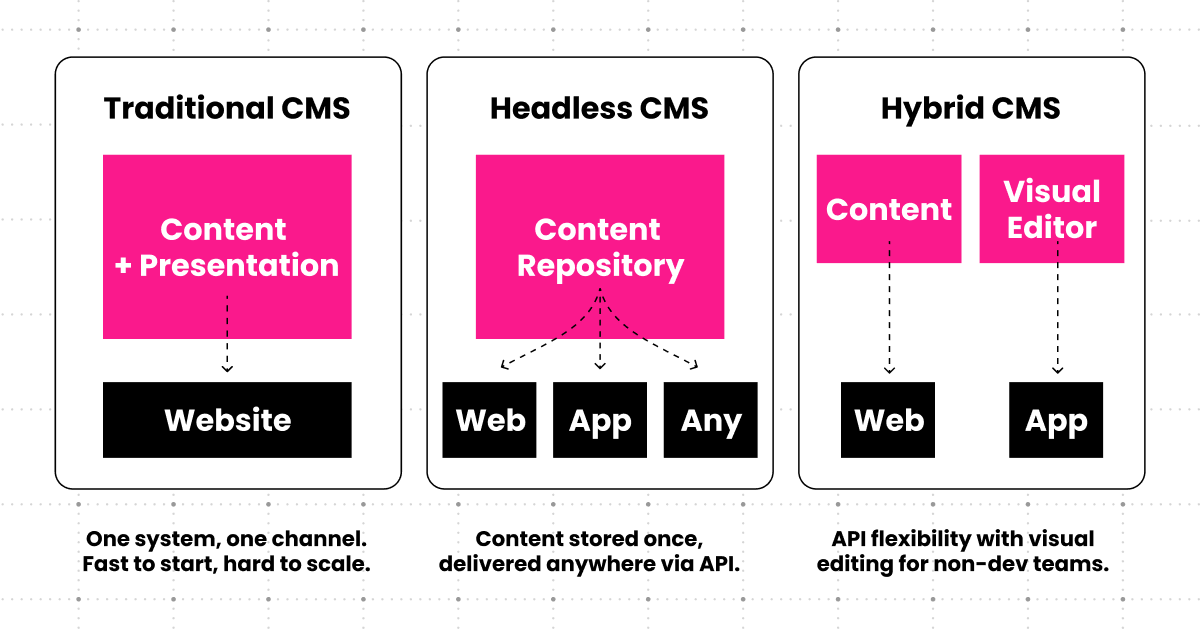
Traditional platforms bundle content management and presentation together. Everything lives in one place: templates, content modeling, presentation layer.
Benefits include faster initial setup, complete out-of-the-box solutions, and familiar patterns for non-technical teams. Traditional platforms deliver functional websites quickly when that’s what you need.
The limitations show up over time. Presentation stays tightly coupled to the CMS. Multi-channel support doesn’t extend much beyond responsive web. Innovation cycles slow down, constrained by monolithic architecture. Technical debt accumulates as your needs evolve beyond the platform’s original design.
Traditional CMS still works for primarily website-focused content, teams without development resources, and simpler use cases. But the gap between what traditional platforms offer and what digital-first B2B companies need keeps widening.
Headless CMS
Headless completely decouples content from presentation. Content lives in the CMS and gets delivered via APIs to any front-end. The CMS doesn’t care how the content displays. That’s your responsibility.
The upside is significant: build any experience you want, deliver content to any channel, give developers complete freedom for web experiences, and adapt as new channels emerge. Clean separation between content and presentation means front-end changes don’t require touching the CMS.
The trade-offs are real too. You need actual development expertise. There’s no built-in presentation or visual page building. Initial costs run higher for custom front-end development. Content teams accustomed to traditional CMS interfaces face a steeper learning curve.
Platforms like Contentful, Sanity, Strapi, and Hygraph work for organizations with multiple digital touchpoints, internal or agency development resources, complex omnichannel requirements, and commitment to flexibility over convenience.
Hybrid CMS
Hybrid platforms deliver headless benefits without sacrificing authoring usability. Content flows via APIs while also providing visual editing and page building that traditional users expect.
The benefits balance both worlds: flexibility plus usability, visual editing and preview, faster time-to-value than pure headless, and lower developer dependency for routine updates. You get API-driven delivery without completely abandoning traditional authoring convenience.
Expect more complexity than pure approaches. Some compromises appear in either flexibility or ease-of-use depending on the platform. Teams sometimes get confused about which capabilities are truly headless versus presentation-dependent.
Storyblok, WordPress VIP with headless capabilities, and certain DXP platforms take the hybrid approach. This fits organizations wanting headless benefits without rebuilding workflows, teams with mixed technical capabilities, and phased transformations where you need quick wins while building toward flexibility.
No universally “best” architecture exists. In 25 years, we’ve seen more failures from choosing based on trends than from honest assessment of team capabilities and actual requirements.
The Best CMS for Enterprise Websites in 2026
The platforms below are all viable options for enterprise CMS in 2026. “Best” depends on your architecture choices, team capabilities, and how your digital properties actually operate.
Platform comparison overview
| Platform | Architecture | Best for | Key strength | Consideration |
|---|---|---|---|---|
| Contentful | Headless | Omnichannel delivery | Mature enterprise reliability | Pricing scales with usage |
| Sanity | Headless | Deep customization | Real-time collaboration | Requires development investment |
| Strapi | Headless | Data ownership | Open‑source flexibility | Self‑hosting complexity |
| Hygraph | Headless | Content federation | GraphQL‑native approach | GraphQL learning curve |
| Contentstack | Headless | Large enterprises | Composable DXP capabilities | Complex for smaller teams |
| Storyblok | Hybrid | Visual editing + flexibility | Component‑based system | Component approach learning curve |
| WordPress VIP | Hybrid | WordPress at enterprise scale | Familiar ecosystem | Different from standard WordPress |
| Builder.io | Hybrid | Marketing velocity | Visual headless editing | Marketing‑focused use cases |
| Prismic | Hybrid | Global companies | Multi‑language support | Initial component setup required |
| Kontent.ai | Hybrid | Collaboration | Unified content hub | Security features vary by tier |
| Adobe AEM | Traditional/DXP | Adobe ecosystem | Comprehensive suite | Significant investment |
| Sitecore | Traditional/DXP | Personalization focus | Advanced personalization | Requires specialized expertise |
| Drupal | Traditional | Customization + security | Open‑source flexibility | Development expertise required |
| HubSpot CMS | Hybrid | HubSpot users | CRM integration | Best within HubSpot ecosystem |
| Magnolia | Hybrid/DXP | Integration‑heavy environments | System connectivity | Interface complexity |
Clear Digital has implemented many of these platforms as part of our DXP and CMS solutions, so the goal here is to help you decide which belong on your shortlist, not crown a single winner.
Best headless CMS platforms
Contentful
Contentful is a mature headless CMS with API‑first architecture, strong documentation, and a well-developed ecosystem. It suits organizations that already have (or plan to have) modern front‑end development skills and need reliable omnichannel delivery rather than a page‑builder CMS. Usage‑based pricing and the need for front‑end expertise mean it’s usually a better fit for teams that treat their website and apps as long‑term products, not one‑off launches.
Sanity
Sanity is built for teams that want to customize almost everything about their CMS experience. The real‑time collaborative editing, portable text model, and developer‑friendly tooling give you a lot of control over how content is structured and managed. It works best for organizations comfortable investing in upfront configuration to get an environment that matches their workflows rather than adapting to a predefined model.
Strapi
Strapi offers an open‑source headless CMS with the option to self‑host or use managed cloud. For teams that care about data ownership and want to avoid vendor lock‑in, that control can be attractive. In practice, it fits organizations with internal infrastructure and DevOps capability; those without it may find the operational overhead outweighs the licensing flexibility.
Hygraph
Hygraph takes a GraphQL‑native approach and focuses on content federation, pulling content from multiple systems into a single API layer. It’s a strong option for enterprises dealing with fragmented content sources (product data here, marketing content there) who want a unified way to deliver that content without a massive migration project. Teams should be comfortable with GraphQL patterns to get full value.
Contentstack
Contentstack positions itself as a composable DXP with a headless CMS at the center. Its microservices architecture, workflow capabilities, and enterprise tooling make sense for larger organizations with complex requirements and multiple teams touching content. Smaller teams can find the platform more than they need, so it tends to shine in environments where there is a clear owner for governance and integrations.
Best hybrid CMS platforms
Storyblok
Storyblok combines a visual editor with a headless backend, giving marketers a page‑building experience while developers still work with modern frameworks. It suits B2B marketing sites where non‑technical users need to create and adjust layouts often, but the team still wants a component‑based, reusable design system. The component model requires some initial setup and discipline, but that work pays off in consistency.
WordPress VIP
WordPress VIP brings enterprise hosting, security, and support to the familiar WordPress authoring experience, with options to use it in a headless architecture. It’s a fit for organizations that already rely on WordPress, have significant content operations, and want to keep that editor workflow while improving scalability and governance. It does not behave like a typical shared‑hosting WordPress site, so teams should treat it as a different class of platform rather than a simple upgrade.
Builder.io
Builder.io focuses on giving marketing teams speed through visual, no‑code editing on top of headless architectures. It works well when the priority is rapid landing page and campaign creation, especially for B2B SaaS teams that iterate frequently on messaging and experiments. It’s less about powering complex applications and more about freeing marketers from day‑to‑day developer dependency.
Prismic
Prismic pairs headless content delivery with its Slice Machine component system, which encourages reusable content sections. It’s a good match for global companies that need multi‑language support and a clear separation between content and layout, and for teams that want an approachable editor experience without abandoning modern front‑end frameworks. The upfront work is defining slices and patterns; after that, content teams can move faster within those constraints.
Kontent.ai
Kontent.ai positions itself as a collaborative content hub, with workflows and governance designed for distributed teams. It suits organizations that need centralized content operations (multiple brands, regions, or business units sharing core assets). Capabilities and security features vary by tier, so buyers should map plans carefully against compliance and governance requirements.
Best traditional / suite CMS platforms
Adobe Experience Manager (AEM)
AEM is part of the broader Adobe Experience Cloud and combines CMS, DAM, and personalization in one suite. It’s a fit for large enterprises already invested in Adobe tools that want tight integration across marketing channels and are prepared for the licensing and implementation commitment. Teams should plan for specialized expertise and a multi‑phase rollout to avoid underusing what they pay for.
Sitecore
Sitecore’s strength is in its personalization and marketing automation capabilities, especially for .NET‑oriented organizations. It works best where there is a clear personalization strategy, data readiness, and technical resources to implement and maintain that strategy. Without that, companies can end up with an expensive CMS that behaves like a basic content repository.
Drupal
Drupal offers deep customization and a strong security track record, which is why it appears across government and regulated industries. It’s a good option for organizations that need complex information architectures or have strict compliance needs and are comfortable making an ongoing investment in Drupal development skills. Out of the box, it is more of a framework than a turnkey product.
HubSpot CMS Hub
HubSpot CMS Hub is tightly integrated with HubSpot’s CRM and marketing tools. It’s a natural choice for organizations that already run campaigns and sales in HubSpot and want a unified view of contacts, content, and analytics. It is strongest for web and email; if you have complex multi‑channel delivery needs, you may still pair it with other components.
Magnolia
Magnolia sits in the hybrid DXP category with a focus on integration and multi‑site management. It’s suited to enterprises that need to connect many systems (portals, internal tools, regional sites) and manage them centrally. The trade‑off is complexity; success usually requires a clear integration strategy and a dedicated technical owner.
Need Help Choosing the Right CMS?
We’ve implemented enterprise CMS solutions for 25+ years. We’ll help you find the platform that actually fits your needs, technical capabilities, and business requirements.
How to Choose the Best CMS for Your Enterprise Website
Features matter, but fit determines whether a CMS works over the long term. This is the lens we use when helping clients evaluate platforms.

Assess your requirements first
Before you compare vendors, get specific about what you need the CMS to do.
- Content complexity: Project content volume over the next few years, list key content types, model relationships, and note any multi‑language and localization needs.
- Channel requirements: Decide whether you are primarily supporting websites or also feeding mobile apps, partner portals, in‑product UIs, or other channels.
- Team capabilities: Be honest about your in‑house developer capacity, your content team’s technical comfort, and where you will rely on agencies or partners.
- Integration needs: Map the systems your CMS must talk to on day one (CRM, marketing automation, analytics, DAM, product data) and which ones can wait.
- Scalability requirements: Capture current and expected traffic, number of brands and sites, and planned geographic expansion.
- Budget reality: Think in terms of total cost of ownership, not just licenses: implementation, integrations, hosting, maintenance, and training over three to five years.
- Timeline: Clarify if you need a full replacement quickly or can phase migration and rollout by region, product, or site.
Most failed CMS projects trace back to vague or incomplete requirements, not a fundamentally “bad” platform.
Evaluation criteria that matter
Once requirements are clear, use them to evaluate platforms on criteria that actually affect day‑to‑day work.
- Developer experience: API quality, SDKs, documentation, framework support, and how quickly teams can ship changes without workarounds.
- Content editor experience: Interface clarity, visual editing and preview, workflow support, and how easily non‑technical users can complete routine tasks.
- Scalability and performance: Proven ability to handle your expected traffic and content volumes, global delivery options, and support for multi‑site architectures.
- Security and compliance: Built‑in security model, SSO and access control, available certifications, and audit capabilities aligned with your industry.
- Integration ecosystem: Pre‑built connectors, API flexibility for custom work, and support for middleware or iPaaS tools so the CMS fits cleanly into your stack.
- Total cost of ownership: Licensing, implementation, hosting, maintenance, scaling, and ongoing enablement and training, viewed over several years rather than one budget cycle.
- Vendor stability: Company track record, product roadmap, support responsiveness, and community health for platforms with partner or open‑source ecosystems.
- Migration path: Complexity and risk of moving existing content and URLs, support for redirects, and how disruptive the switch will be for your teams.
Build your shortlist
From there, narrow to three to five platforms that actually fit your profile.
- Request demos tailored to your use cases, not the standard slide deck.
- Put both technical and business stakeholders in the room.
- Test with real content and real workflows where possible, even in a small proof‑of‑concept.
- Pay attention to how vendors respond to hard questions and edge cases; sales‑cycle responsiveness is often a preview of support.
- Check references from organizations that look like yours in size and complexity, not just logos.
The goal of this round is not to find perfection, but to identify options where trade‑offs are acceptable for your context.
Consider implementation partners
Platform selection and implementation quality are tightly linked. Some organizations have the internal skills to own everything; many benefit from an experienced partner, especially for first‑time headless or composable projects.
Good implementation partners typically offer:
- Platform‑specific expertise and certifications.
- B2B tech experience, so they understand long sales cycles, complex products, and multi‑stakeholder buying.
- Strategic guidance on content modeling, governance, and integration, not just page builds.
- Ongoing support options, so the relationship doesn’t end on launch day.
Clear Digital’s DXP and CMS practice is built on that model: platform‑agnostic recommendations, 25+ years working with enterprise CMS and DXP tools, and long‑term client relationships rather than one‑off builds. The aim is straightforward: recommend what fits your organization, because that is the only way these projects succeed over time.
Key Trends Shaping Enterprise CMS in 2026
Two trends now show up in real roadmap decisions instead of just on vendor slides.
AI-enhanced content management
AI is now embedded in most enterprise CMS platforms, but the useful applications remain narrow. Automated tagging and metadata help reduce manual taxonomy work. Content performance prediction can inform publishing priorities. Search improvements make it easier to surface relevant content across large repositories.
The over-promised area is content generation. AI can assist with drafts and variations, but it still requires human editing to match brand voice and strategic intent. In our AI enablement work, we see the strongest results when AI handles repetitive content operations (tagging, formatting, basic personalization) while teams focus on strategy and quality control.
What this means for your roadmap: Look for platforms with native AI for metadata and search, but don’t pay a premium for “AI content generation” features you’ll rarely use. Evaluate how well the CMS integrates with external AI tools you already use or plan to adopt.
Composable architecture maturity
The composable DXP model (CMS as one component in a best-of-breed stack) has moved from concept to operational reality for mid-size and enterprise B2B companies. API-first architecture is standard. Microservices replace monolithic suites. Teams mix and match components to build their ideal stack.
This shift reduces vendor lock-in and increases negotiating leverage, but it also requires stronger technology integration capabilities. You need teams that can architect, connect, and maintain a multi-vendor stack. The composable approach works when you have that expertise; it creates operational chaos when you don’t.
What this means for your roadmap: Prioritize platforms with strong APIs and proven integration ecosystems. Plan for integration and orchestration costs upfront. If your team is small or spread thin, a more integrated platform may serve you better than a composable stack, regardless of what’s trendy.
Real-World Success: Enterprise CMS Implementation Results
CMS implementations succeed on more than platform choice. The combination of a fit‑for‑purpose CMS, a realistic implementation plan, and deliberate change management is what produces meaningful business outcomes.
When those pieces line up, we see consistent patterns across enterprise projects:
- Improved content velocity. Marketing teams move from “next sprint” timelines to publishing key pages in hours, because they are no longer logging tickets for every layout change. That shift shows up in faster campaign launches and websites that can keep pace with evolving product stories.
- Greater marketing autonomy. In healthy implementations, most routine work happens without developer intervention. Developers focus on components, performance, and integrations instead of swapping hero images or tweaking forms, which is how teams avoid CMS fatigue a year after launch.
- Better performance and stability. Moving from older monolithic setups to modern architectures typically improves load times and uptime, as seen in Clear Digital work like Autodesk and Splunk, where updated CMS and front‑end foundations led to faster, more reliable experiences for complex sites.
- More effective use of multi‑channel content. A well‑implemented CMS makes it easier to reuse core content across web, campaigns, and other digital properties instead of maintaining slightly different versions in multiple tools. That consistency matters more as brands add more touchpoints.
- Smoother collaboration. Defined workflows, clear roles, and version control reduce last‑minute scrambles and “who changed this?” moments. Teams can work in parallel on major launches instead of waiting in line for the one person who “knows the CMS.”
Clear Digital’s own DXP and CMS projects for companies like Aviatrix, Signifi, Cohesity, and other B2B tech brands reflect these themes: better publishing control, stronger performance, and more scalable content operations rather than just a new interface.
The through line is simple: platforms enable these results, but they do not create them on their own. Without aligned processes, clear ownership, and ongoing optimization, even the right CMS will underperform. For specific examples, explore Clear Digital’s case studies focused on DXP and CMS work with B2B technology companies.
Common Enterprise CMS Mistakes to Avoid
Choosing based on features alone
The longest feature list doesn’t mean best fit. We’ve seen companies select platforms that excel on paper but fail in daily use because they didn’t match how teams actually work. Platform fit, team capabilities, and organizational alignment matter more than checkbox counts.
Underestimating implementation complexity
Enterprise CMS implementation is transformation, not installation. In our experience, the projects that struggle most are the ones that budget for licenses and basic setup but not for discovery, content modeling, integration development, training, and change management. Those aren’t optional extras; they’re the work.
Ignoring content editor experience
Developer-only evaluation creates platforms that work in theory but fail in practice. If your content team can’t publish routine updates without opening tickets, marketing velocity drops and IT becomes a bottleneck. Balance technical capabilities with daily usability for the people who’ll use the system most.
Overlooking total cost of ownership
License fees are just the start. Factor in implementation, professional services, hosting, ongoing maintenance, scaling costs, training, and integration work. That cheaper upfront option often costs significantly more over three to five years once you account for consulting fees and slower velocity.
Vendor lock-in without exit strategy
Nobody plans to switch platforms immediately, but having options provides negotiating leverage and future flexibility. Before committing, understand data portability, content export capabilities, and realistic migration paths. These conversations are easier to have during procurement than two years into a contract.
Skipping proof of concept for finalists
Vendor demos show possibilities. POCs reveal reality. Testing with your actual content, your workflows, and your integration requirements before deciding prevents expensive mistakes. The investment in a proper POC is small compared to the cost of choosing poorly.
Neglecting change management
Technology alone doesn’t deliver results. Without training, process changes, and stakeholder buy-in, even the best platform underperforms. Plan for change management from the beginning, not as an afterthought once users complain.
The most expensive CMS mistake isn’t choosing the wrong platform. It’s implementing the right one poorly: success requires equal attention to technology, process, people, and strategy.
The Implementation Journey: What to Expect
Understanding realistic timelines and phases helps set appropriate expectations and allocate resources properly.
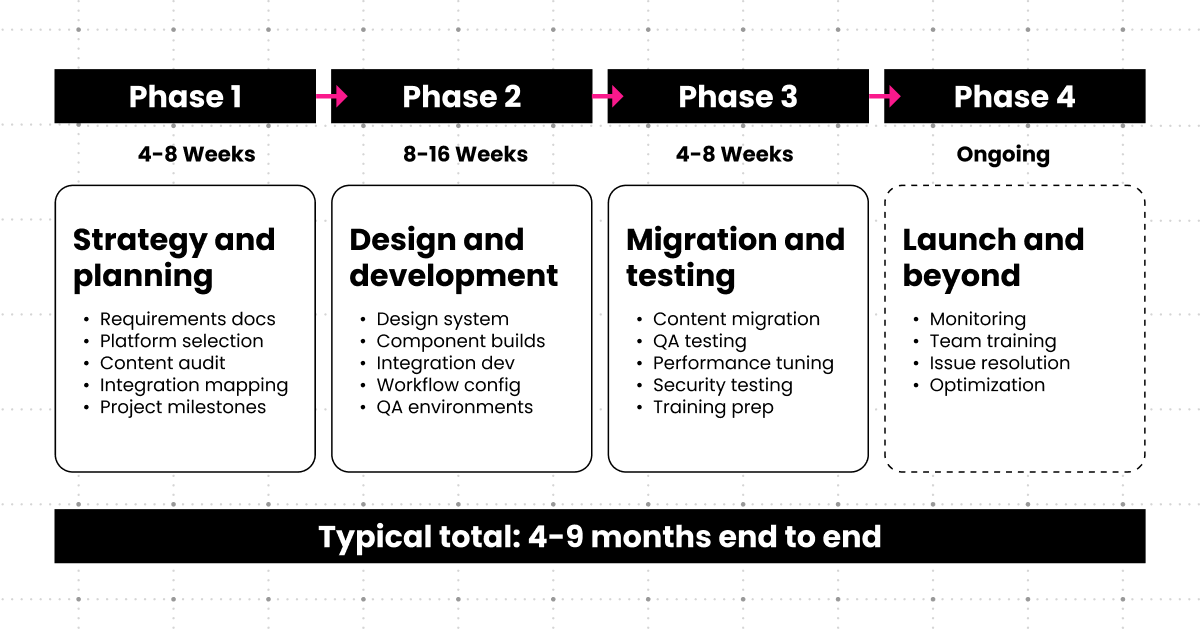
Phase 1: Strategy and planning (4-8 weeks)
Requirements documentation that actually reflects how your teams work. Platform selection and validation against real use cases, not sales demos. Content audit and migration planning (this always takes longer than expected). Information architecture that supports both current needs and future growth. Integration mapping across your entire tech stack. Team formation and role definition. Project timeline and milestone agreement.
Phase 2: Design and development (8-16 weeks)
Design system creation aligned with brand guidelines. Component development for reusable content blocks. Template building for different page types and content needs. Integration development connecting CMS to marketing automation, CRM, analytics, and other critical systems. Content modeling that balances flexibility and governance. Workflow configuration matching approval processes. Testing environment setup for quality assurance.
Phase 3: Content migration and testing (4-8 weeks)
Content migration execution (automated migration is never perfect). Quality assurance testing across browsers, devices, and user journeys. Performance optimization to hit page load targets. Security testing and penetration testing for enterprise deployments. User acceptance testing with actual content teams. Training development for different user roles.
Phase 4: Launch and optimization (ongoing)
Phased or full launch depending on risk tolerance and business constraints. Post-launch monitoring for performance, errors, and user adoption. Team training for content creators, approvers, and administrators. Issue resolution (there will be issues). Performance optimization based on real-world usage. Continuous improvement as teams get comfortable with the platform.
Realistic timeline: 4-9 months for typical enterprise implementation. Longer for complex multi-site or heavily customized deployments. Anyone promising faster timelines is either oversimplifying or setting you up for disappointment.
Success factors: Executive sponsorship that removes roadblocks. Dedicated project team, not people splitting time across five initiatives. Clear requirements defined upfront. Realistic timelines with buffer for inevitable delays. Budget for contingencies (plan for 15-20% over initial estimates). Change management focus from day one. Partner expertise for platforms you haven’t implemented before.
Making Your Decision: Next Steps
Ready to move forward with enterprise CMS evaluation and selection? Here’s your roadmap.
Step 1: Assess your current state. Audit existing content, systems, and workflows. Document pain points and requirements. Evaluate team capabilities honestly. Establish budget parameters for total cost of ownership.
Step 2: Build your evaluation team. Include technical, business, and content stakeholders. Define roles and decision-making authority. Allocate time for thorough evaluation. Rushed decisions cost more long-term.
Step 3: Create your shortlist. Based on requirements, narrow to 3-5 platforms. Schedule vendor demos focused on your use cases. Request detailed pricing and implementation estimates with realistic assumptions.
Step 4: Conduct deep evaluation. Hands-on platform testing where possible. Reference checks with similar organizations. Proof of concept for finalists when the investment warrants it. Total cost of ownership analysis across 3-5 years.
Step 5: Consider implementation partnership. Evaluate internal versus external implementation capabilities. If partnering, vet agency expertise and approach beyond their sales pitch. Ensure alignment on strategy, not just tactical execution. Look for systems support capabilities for ongoing success.
Step 6: Plan for success. Realistic timeline and resource allocation. Change management strategy from day one. Training and adoption plans for all user groups. Post-launch optimization approach (launch is the beginning, not the end).
This is a significant investment requiring thorough evaluation. Rushing the decision or cutting corners on implementation typically costs more long-term than doing it right initially.
Ready to Find the Best CMS for Your Enterprise?
Partner with our team to navigate the enterprise CMS landscape. With 25+ years implementing solutions for B2B tech companies (from AI and cybersecurity firms to SaaS companies) we’ll help you choose and implement the platform that delivers real results.
Get our latest insights in your inbox

8 Criteria for Choosing a B2B Web Redesign Agency
By Clear Digital on September 15, 2026
Read more
What a B2B Website Redesign Requires From Your Team
By Clear Digital on September 11, 2026
Read more
How to Justify a Website Redesign to Your CEO, CFO, or Board
By Clear Digital on September 11, 2026
Read more