Websites built on aging CMS platforms can be up to 50% slower than modern equivalents — a structural consequence of running software designed for a different era of web infrastructure.

Your CMS still publishes pages. The editors can still log in. IT hasn’t flagged an outage in months. From the outside, everything looks fine.
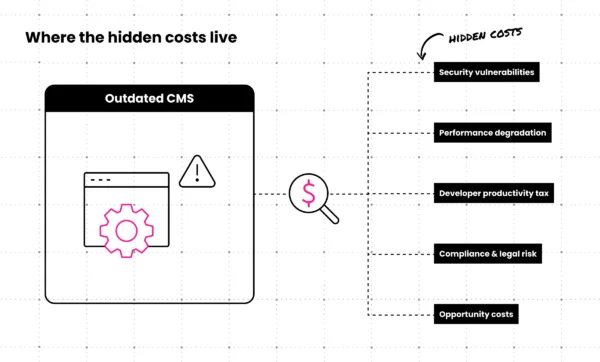
But “still works” is a low bar for technology that sits at the center of your digital presence. Behind that functional façade, an aging CMS quietly accumulates costs: security exposure that grows with every skipped patch cycle, performance drag that chips away at conversions, developer hours absorbed by maintenance instead of progress, and compliance gaps that don’t announce themselves until a breach or audit forces the issue.
The real problem isn’t that something is visibly broken. It’s that the costs are invisible until they aren’t.
This guide breaks down where those costs actually live, how they show up in your security posture, performance metrics, developer capacity, and compliance exposure, and what to watch for as signals that your CMS has crossed from “older but functional” into genuine liability territory.
Security Vulnerabilities: The Most Dangerous Hidden Cost
Security is where the conversation about outdated CMS platforms gets serious fast.
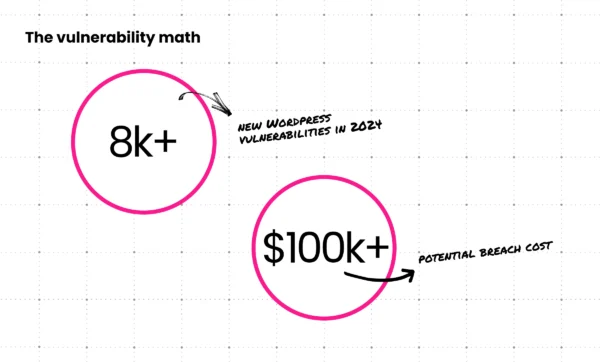
In 2024, nearly 8,000 new vulnerabilities were discovered across the WordPress ecosystem — a 34% increase over the prior year. More troubling: more than half of the plugin developers notified of a vulnerability failed to issue a patch before public disclosure. According to Patchstack’s 2025 State of WordPress Security report, that means attackers often have a working map to exploit your site before a fix even exists. Running outdated software in that environment isn’t a calculated risk. It’s an open door.
Attackers don’t need to be clever about this. They don’t need to discover new flaws. They can scan for known, publicly documented vulnerabilities in outdated systems and exploit them at scale. The longer an organization delays an upgrade, the larger the attack surface grows, and the more detailed the roadmap becomes for anyone looking to exploit it.
The cost of a breach extends well beyond emergency remediation. Regulatory fines, security audits, legal fees, and reputation management can exceed $100,000 depending on the scope of the incident and the industry involved. For B2B companies with enterprise clients, the reputational damage of a disclosed breach can cost far more than the direct financial penalties.
The Plugin Problem: When “Add-Ons” Become Liabilities
Most CMS security incidents don’t start with the core platform. They start with outdated CMS plugins.
Plugins extend functionality, but they also create entry points. Every plugin you run is a dependency with its own update cycle, developer community, and vulnerability history. When plugin developers stop maintaining their work, those tools don’t disappear from your site. They just stop receiving patches.
The dangerous assumption is that if a plugin still functions, it’s still safe. That’s not how attackers think about it. A plugin can be fully operational, rendering correctly on every page, while containing a known, publicly listed vulnerability that was documented months ago. The exploitability has nothing to do with whether the plugin looks broken.
Popular CMS platforms like WordPress are particularly exposed because of the sheer size of their plugin ecosystems. More plugins, more developers, more variation in maintenance quality. More attack surface for any site running an older configuration.
Before you treat a plugin as “fine,” check four things:
- Last update date. If it hasn’t been updated in 12+ months, treat it as a risk.
- Compatibility. Is it still confirmed compatible with your current CMS version?
- Developer activity. Is the developer still responding to support threads?
- Public vulnerability databases. Search the plugin name in CVE or WPScan databases.
Each additional outdated plugin compounds the problem. A single abandoned plugin is a risk. Ten of them is a security posture that no amount of monitoring can fully offset.
Performance Degradation and User Experience Costs
Security aside, outdated CMS platforms create a second category of costs that show up directly in business metrics: performance.
The performance issues compound in predictable ways:
- Traffic spike failures. Legacy systems weren’t architected for cloud-native horizontal scaling. When demand spikes during a product launch, a PR hit, or a successful campaign, older platforms buckle or slow to a crawl at exactly the wrong moment.
- Integration brittleness. Modern marketing and sales operations depend on CRMs, marketing automation platforms, and analytics tools. Connecting these to an outdated CMS typically means fragile custom integrations that require ongoing maintenance and break when any connected system updates.
- Mobile experience gaps. CMS platforms built before mobile-first design became standard weren’t engineered with responsive architecture in mind. The results show in Core Web Vitals scores and user behavior data.
- SEO penalties. Google’s ranking signals explicitly account for page speed, Core Web Vitals, and security indicators. A slow site with security warnings isn’t just a bad user experience. It’s a ranking disadvantage against competitors running modern infrastructure.
Every additional second of load time increases bounce rates and reduces conversion probability. The performance gap between a well-maintained modern CMS and an outdated one isn’t just a technical concern. It translates directly to lost revenue through abandoned sessions and depressed search visibility.
For a deeper look at how site performance connects to conversion outcomes, Clear Digital’s guide on B2B conversion rate optimization and UX strategy covers the relationship between experience quality and measurable business results.
The Developer Productivity Tax
There’s a cost category that rarely appears in budget discussions but shows up consistently in team morale and headcount turnover: the toll that legacy CMS maintenance takes on your development team.
Developer costs for maintaining an outdated CMS can reach $5,000+ per year for basic upkeep alone, before accounting for emergency fixes, integration workarounds, or the compounding cost of technical debt that accumulates with every rushed patch.
That figure understates the real cost. The more corrosive problem is the opportunity cost. Every hour a developer spends keeping an aging system functional is an hour they’re not spending on features, improvements, or initiatives that move the business forward. Over time, the ratio of maintenance to meaningful work shifts in the wrong direction.
Technical debt compounds. A workaround built in Q1 to keep a broken integration functional becomes the constraint that makes the Q3 feature project three times harder than it should be. Fragile scripts accumulate. Undocumented hacks become institutional knowledge that lives in one person’s head.
The talent dimension is equally concrete. Developers with options, and experienced developers have options, are not enthusiastic about working in systems where their primary job is to fight yesterday’s platform. Recruiting for roles that require legacy CMS expertise is harder and more expensive than recruiting for modern stack roles. When a senior developer leaves, the institutional knowledge about how to manage the system’s quirks often leaves with them.
This is a real retention risk, not a soft concern. If your team is spending its energy on reactive maintenance rather than building things, the engineers who have the most options will be the first to notice — and the first to find somewhere else to take those skills.
Clear Digital’s perspective on B2B website redesign and maintenance planning addresses how organizations can structure maintenance investment to protect team capacity for higher-value work.
Compliance and Legal Risks with an Unsupported CMS
The regulatory risk of running an unsupported CMS is one of the least visible costs until it becomes one of the most expensive.
Compliance frameworks don’t make allowances for legacy infrastructure. GDPR, PCI-DSS, HIPAA for healthcare organizations, and SOC 2 for SaaS providers all have explicit or implicit expectations that organizations run supported, actively patched software. An unsupported CMS creates structural gaps in that posture, gaps that become audit findings, remediation requirements, and in breach scenarios, evidence of negligence.
The specific exposure varies by industry and framework, but the pattern is consistent:
- Audit failures. Compliance audits look at security posture holistically. An end-of-life CMS with unpatched known vulnerabilities is a finding. Depending on the framework, it can be a blocking finding.
- Cyber insurance implications. Coverage policies increasingly require that insured systems run supported software. A breach involving a known, publicly disclosed vulnerability in an unsupported platform may not be covered, or coverage may be reduced based on the organization’s demonstrated awareness of the risk.
- Liability exposure. If a breach occurs on a system where the organization knew about the vulnerability and failed to remediate, the legal exposure increases substantially. “We knew and chose not to act” is a difficult position in litigation.
- Vendor security requirements from clients. B2B buyers — particularly in enterprise and regulated industries — are increasingly requiring security certifications and documented software currency as part of vendor assessment processes. An unsupported CMS can become a sales obstacle.
An unsupported CMS isn’t just a technology decision with a technology consequence. It creates legal and business risk that belongs in a conversation with legal, compliance, and executive leadership — not just IT.
Opportunity Costs: What You’re NOT Doing
The costs covered so far are mostly defensive — things that go wrong when you stay on a legacy platform. This section addresses the other half of the equation: what you can’t do.
Modern CMS platforms support capabilities that are simply unavailable on legacy systems:
- Headless architecture that decouples content from presentation, enabling delivery across channels and devices from a single content repository
- API-first integrations that connect cleanly with modern marketing, analytics, and sales tools without custom middleware
- AI-assisted content workflows now embedded in most enterprise platforms, reducing manual taxonomy work and accelerating content production
- Personalization at scale, where content adapts based on user segment, behavior, or account data in ways that older systems weren’t designed to support
- Performance infrastructure built for cloud-native deployment, autoscaling, and global CDN delivery
Every year you defer a CMS upgrade is another year your team can’t use these capabilities. That’s not just a feature gap. It’s a compounding competitive disadvantage. Your competitors with modern infrastructure can test, iterate, and launch faster. They can personalize experiences you can’t. They can integrate tools you’re still manually workarounding.
On modernization projects, Clear Digital often pairs a headless CMS with a modern design system so teams can launch new experiences in weeks instead of quarters, while keeping performance and security baselines high. That kind of velocity isn’t achievable on legacy infrastructure, no matter how much custom work gets layered on top.
The budget and engineering resources absorbed by legacy maintenance don’t disappear when you choose to stay. They get redirected away from growth initiatives into keeping the current system operational. That’s the opportunity cost: the things your team would be doing if maintenance wasn’t consuming the bandwidth.
For a practical look at what modern CMS architecture makes possible, Clear Digital’s guide on how to choose the right headless CMS is a useful reference for organizations evaluating their options.
The True Cost Comparison: Legacy vs. Modern CMS
The business case for CMS modernization often fails to account for the full scope of legacy costs. Direct licensing costs are visible. Everything else tends to be distributed across budget lines, absorbed into developer time, or attributed to other causes after the fact.
Here’s a more complete picture of where the costs actually live:
| Cost Category | Legacy CMS | Modern CMS |
|---|---|---|
| Hosting & Infrastructure | Often higher; on-premise or aging cloud config | Cloud-native, optimized; scales with demand |
| Licensing & Support | Vendor support may be unavailable; workaround costs escalate | Vendor-supported; support contracts clear and current |
| Developer Maintenance | $5,000–$30,000+/year for upkeep and workarounds | Reduced maintenance burden; dev time shifts to features |
| Security Monitoring & Remediation | Ongoing exposure; emergency fix costs unpredictable | Vendor-patched; security posture substantially stronger |
| Compliance & Audit Remediation | Audit findings require remediation spend; insurance gaps | Supported platform aligns with audit expectations |
| Emergency Costs | Unplanned downtime, breached integrations, rushed fixes | Reduced frequency; modern tooling lowers incident rate |
| Opportunity Costs | Delayed launches; capabilities unavailable; competitive gap | Modern capabilities enabled; teams focus on growth |
Businesses running legacy systems have been estimated to spend over $2 million annually when all costs are fully accounted for, including the workarounds, integrations, and mitigations that accumulate over time. That number isn’t always visible in a single budget line, but it’s real.
In one recent assessment for a B2B SaaS client, we found that legacy CMS maintenance, emergency fixes, and workarounds were consuming the equivalent of a full-time engineer and delaying key roadmap features by 4–6 months. The direct costs were modest on paper. The opportunity cost was significant.
The break-even question isn’t “can we afford to modernize?” It’s “how long have we already been paying for it in ways we haven’t been tracking?”
When to Upgrade: Reading the Warning Signs
Knowing the costs is useful. Knowing where your organization actually sits against them is what enables a decision.
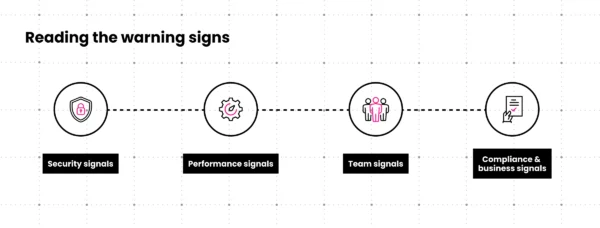
The following warning signs indicate that a CMS has moved from “aging” to “liability.”
Security signals:
- Your CMS version has reached or is within 12 months of end-of-life
- Security patches are no longer available from the vendor
- Multiple plugins are outdated, abandoned, or flagged in public vulnerability databases
- You’ve had a security incident or near-miss in the past 24 months
Performance signals:
- Load times are failing Core Web Vitals thresholds
- The site degrades noticeably during traffic spikes
- Integrations with CRM, marketing automation, or analytics require ongoing manual maintenance
Team signals:
- Developers are spending a disproportionate share of their time on CMS maintenance
- You’re struggling to hire developers willing to work in your current technology stack
- Institutional knowledge about how the CMS works is concentrated in one or two people
Compliance and business signals:
- You’ve had audit findings related to software currency or security posture
- Clients or prospects are asking about your software security certifications
- Competitors are shipping experiences you can’t build on your current platform
By the time a legacy CMS shows visible failure, the hidden costs have already been accumulating for years. Waiting for a visible failure means waiting until the accumulated cost becomes undeniable — a more expensive time to act.
For more context on Clear Digital’s work across industries navigating these decisions, see our work.
Moving Forward: Your CMS Modernization Assessment
CMS modernization is not a small decision. It involves budget, internal alignment, technical planning, and change management. The hesitation is understandable, but the cost of continued inaction compounds in ways that make delay progressively more expensive, not less.
The hidden costs covered in this guide, security vulnerability, performance degradation, developer productivity loss, compliance risk, and foregone capabilities, don’t pause while you deliberate. They accumulate.
A structured assessment is the right starting point. Before committing to a migration path, a CMS assessment should give you:
- Security posture review. A clear picture of your current vulnerability exposure, including end-of-life status and plugin risk inventory.
- Performance baseline. Measured performance against current benchmarks, with quantified improvement potential.
- Technical debt inventory. An honest accounting of workarounds, fragile integrations, and maintenance burden.
- Upgrade path options. A range of modernization approaches mapped to your requirements, timeline, and budget, from incremental improvement to full migration.
- ROI projection. A business case that accounts for both the costs of staying and the investment required to move.
Most organizations discover a mix of quick wins, like deprecating high-risk plugins, and larger structural decisions, like replatforming or moving to headless, that can be staged over 12–24 months instead of treated as a single, monolithic project. That sequencing matters: it keeps modernization budgets manageable and reduces organizational risk.
Clear Digital has been guiding B2B technology companies through CMS and DXP implementations for 25+ years. That history includes platform-agnostic evaluations, complex content migrations, custom development, and long-term support relationships with clients who are still running the systems we helped them build. With a client retention rate above 90% across core service lines, we’ve seen how legacy CMS issues compound over multiple budget cycles, and how much easier they are to address before they become emergencies. The goal of an assessment isn’t to sell a migration. It’s to give you an accurate picture of where you stand so you can make an informed decision.
If you’re uncertain whether your CMS has crossed the line from “aging” to “liability,” that uncertainty itself is worth investigating.
Ready to See What Your CMS Is Really Costing You?
Legacy platforms rarely fail all at once. They drain budget through security risk, performance drag, and developer burnout long before anything looks obviously broken. A structured CMS assessment gives you a clear view of that hidden cost and a realistic modernization path.
Clear Digital’s team evaluates your current platform across security, performance, technical debt, and opportunity cost, then maps upgrade options to your budget and roadmap so you’re not guessing where to invest next.
Assess Your CMS Risk Profile · Explore Website Development Services · View Digital Transformation Case Studies
Get our latest insights in your inbox
8 Criteria for Choosing a B2B Web Redesign Agency
Article
8 Criteria for Choosing a B2B Web Redesign Agency
By Clear Digital on September 15, 2026
Read moreWhat a B2B Website Redesign Requires From Your Team
Article
What a B2B Website Redesign Requires From Your Team
By Clear Digital on September 11, 2026
Read moreHow to Justify a Website Redesign to Your CEO, CFO, or Board
Article
How to Justify a Website Redesign to Your CEO, CFO, or Board
By Clear Digital on September 11, 2026
Read more